STEAMDB NEXUS

Steam app 2888120 · updated 13 Sep 2026, 07:23 UTC

Auto Clicker

Auto Clicker is secure, works with games and apps, and removes the need for repeated clicking. You can use the Standard or Advanced mode according to what best suits your needs.

Auto Clicker Steam header artwork
PlaysaurusPlaysaurus
670playing now
67024-hour peak
821all-time peak
634average, last 30 days

The last 30 days

−12Gain−1.85%% gain821Peak

718 hourly samples, with the daily peak drawn over them. Weekends are shaded.

022244366588727 Aug01 Sep06 Sep11 Sep16 Sep21 Sep26 SepThursday 27 August 2026706 peakFriday 28 August 2026723 peakSaturday 29 August 2026761 peakSunday 30 August 2026804 peakMonday 31 August 2026749 peakTuesday 01 September 2026735 peakWednesday 02 September 2026683 peakThursday 03 September 2026733 peakFriday 04 September 2026721 peakSaturday 05 September 2026774 peakSunday 06 September 2026821 peakMonday 07 September 2026771 peakTuesday 08 September 2026726 peakWednesday 09 September 2026674 peakThursday 10 September 2026656 peakFriday 11 September 2026675 peakSaturday 12 September 2026707 peakSunday 13 September 2026765 peakMonday 14 September 2026743 peakTuesday 15 September 2026665 peakWednesday 16 September 2026653 peakThursday 17 September 2026670 peakFriday 18 September 2026676 peakSaturday 19 September 2026733 peakSunday 20 September 2026775 peakMonday 21 September 2026683 peakTuesday 22 September 2026674 peakWednesday 23 September 2026644 peakThursday 24 September 2026654 peakFriday 25 September 2026667 peakSaturday 26 September 2026670 peak
Daily peakEvery hourly sample

All time

30 months, April 2024 to September 2026. The highest number of people in the game at once, each month, on a time axis -- a gap in the record stays a gap.

0222443665887Apr 2024Sep 2024Feb 2025Jul 2025Dec 2025May 2026April 20247 monthly peakMay 202415 monthly peakJune 202448 monthly peakJuly 202444 monthly peakAugust 202450 monthly peakSeptember 202453 monthly peakOctober 202468 monthly peakNovember 202462 monthly peakDecember 2024222 monthly peakJanuary 2025252 monthly peakFebruary 2025263 monthly peakMarch 2025194 monthly peakApril 2025211 monthly peakMay 2025225 monthly peakJune 2025262 monthly peakJuly 2025437 monthly peakAugust 2025371 monthly peakSeptember 2025346 monthly peakOctober 2025384 monthly peakNovember 2025418 monthly peakDecember 2025519 monthly peakJanuary 2026586 monthly peakFebruary 2026662 monthly peakMarch 2026693 monthly peakApril 2026710 monthly peakMay 2026721 monthly peakJune 2026735 monthly peakJuly 2026767 monthly peakAugust 2026804 monthly peakSeptember 2026821 monthly peak
Monthly peak

The last four months

Show:

The highest number of people in the game at once, each month. Four, because four is as far back as the source keeps anything finer than one figure a month.

0222443665887July 2026August 2026September 2026October 2026July 2026767 peak — daily detail belowAugust 2026804 peak — hourly detail belowSeptember 2026821 peak — hourly detail below
Monthly peakHas finer data

July 2026

31 days, each one the highest figure that day. The source keeps no hourly detail this far back. Weekends are shaded.

020741462182801 Jul06 Jul11 Jul16 Jul21 Jul26 Jul31 JulWednesday 01 July 2026767 peakThursday 02 July 2026741 peakFriday 03 July 2026761 peakSaturday 04 July 2026750 peakSunday 05 July 2026765 peakMonday 06 July 2026747 peakTuesday 07 July 2026747 peakWednesday 08 July 2026733 peakThursday 09 July 2026703 peakFriday 10 July 2026696 peakSaturday 11 July 2026715 peakSunday 12 July 2026727 peakMonday 13 July 2026698 peakTuesday 14 July 2026727 peakWednesday 15 July 2026703 peakThursday 16 July 2026667 peakFriday 17 July 2026704 peakSaturday 18 July 2026707 peakSunday 19 July 2026699 peakMonday 20 July 2026693 peakTuesday 21 July 2026676 peakWednesday 22 July 2026656 peakThursday 23 July 2026701 peakFriday 24 July 2026685 peakSaturday 25 July 2026720 peakSunday 26 July 2026709 peakMonday 27 July 2026700 peakTuesday 28 July 2026706 peakWednesday 29 July 2026691 peakThursday 30 July 2026691 peakFriday 31 July 2026714 peak

August 2026

31 days as the curve, each the highest figure that day. Behind it, 108 hourly samples from 27 Aug, which is as far back as the source keeps every hour. Weekends are shaded.

021743465186801 Aug06 Aug11 Aug16 Aug21 Aug26 Aug31 AugSaturday 01 August 2026716 peakSunday 02 August 2026747 peakMonday 03 August 2026756 peakTuesday 04 August 2026741 peakWednesday 05 August 2026752 peakThursday 06 August 2026705 peakFriday 07 August 2026683 peakSaturday 08 August 2026728 peakSunday 09 August 2026736 peakMonday 10 August 2026707 peakTuesday 11 August 2026690 peakWednesday 12 August 2026668 peakThursday 13 August 2026655 peakFriday 14 August 2026686 peakSaturday 15 August 2026712 peakSunday 16 August 2026770 peakMonday 17 August 2026721 peakTuesday 18 August 2026719 peakWednesday 19 August 2026711 peakThursday 20 August 2026736 peakFriday 21 August 2026736 peakSaturday 22 August 2026751 peakSunday 23 August 2026745 peakMonday 24 August 2026728 peakTuesday 25 August 2026692 peakWednesday 26 August 2026703 peakThursday 27 August 2026706 peakFriday 28 August 2026723 peakSaturday 29 August 2026761 peakSunday 30 August 2026804 peakMonday 31 August 2026749 peak

September 2026

26 days as the curve, each the highest figure that day. Behind it, 610 hourly samples. Each dip is a night. Weekends are shaded.

022244366588701 Sep05 Sep09 Sep13 Sep17 Sep21 Sep25 SepTuesday 01 September 2026735 peakWednesday 02 September 2026683 peakThursday 03 September 2026733 peakFriday 04 September 2026721 peakSaturday 05 September 2026774 peakSunday 06 September 2026821 peakMonday 07 September 2026771 peakTuesday 08 September 2026726 peakWednesday 09 September 2026674 peakThursday 10 September 2026656 peakFriday 11 September 2026675 peakSaturday 12 September 2026707 peakSunday 13 September 2026765 peakMonday 14 September 2026743 peakTuesday 15 September 2026665 peakWednesday 16 September 2026653 peakThursday 17 September 2026670 peakFriday 18 September 2026676 peakSaturday 19 September 2026733 peakSunday 20 September 2026775 peakMonday 21 September 2026683 peakTuesday 22 September 2026674 peakWednesday 23 September 2026644 peakThursday 24 September 2026654 peakFriday 25 September 2026667 peakSaturday 26 September 2026670 peak

October 2026

Auto Clicker was released on Sep 19, 2024.

Not out yet.There is nothing to draw for this month.
Nothing here is interpolated or estimated; where a sample is missing the line is broken.

Game information

Updated 13 Sep 2026, 07:23 UTC
App ID
2888120
Last updated
26 Aug 2026 build 24956313
Update pace
Quiet no update while we have been watching · 0 in 14 days watched
Developer
Playsaurus
Publisher
Playsaurus
Release date
Sep 19, 2024
Platforms
WindowsmacOS
Download size
202 MB128 MB
Install size
640 MB609 MB
Genres
Utilities
Game modes
Controller support
Unknown
Achievements
8

Features & support

Steam features

Steam AchievementsSteam Trading CardsSteam CloudFamily Sharing

Controllers & input

Accessibility

Popular tags

UtilitiesAutomationIncrementalPoint & ClickManagementSoftware
About this gameFull description from Steam
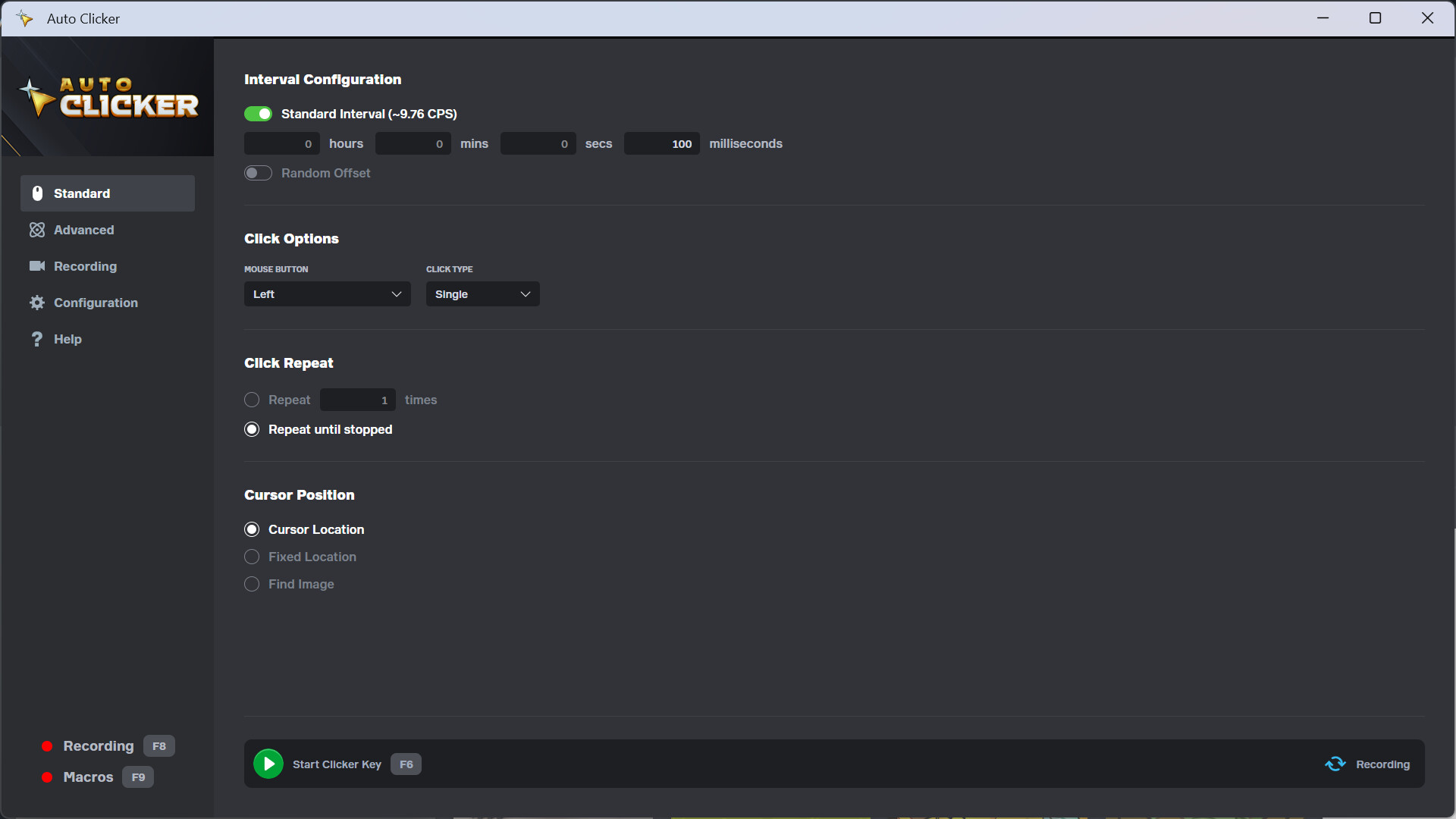
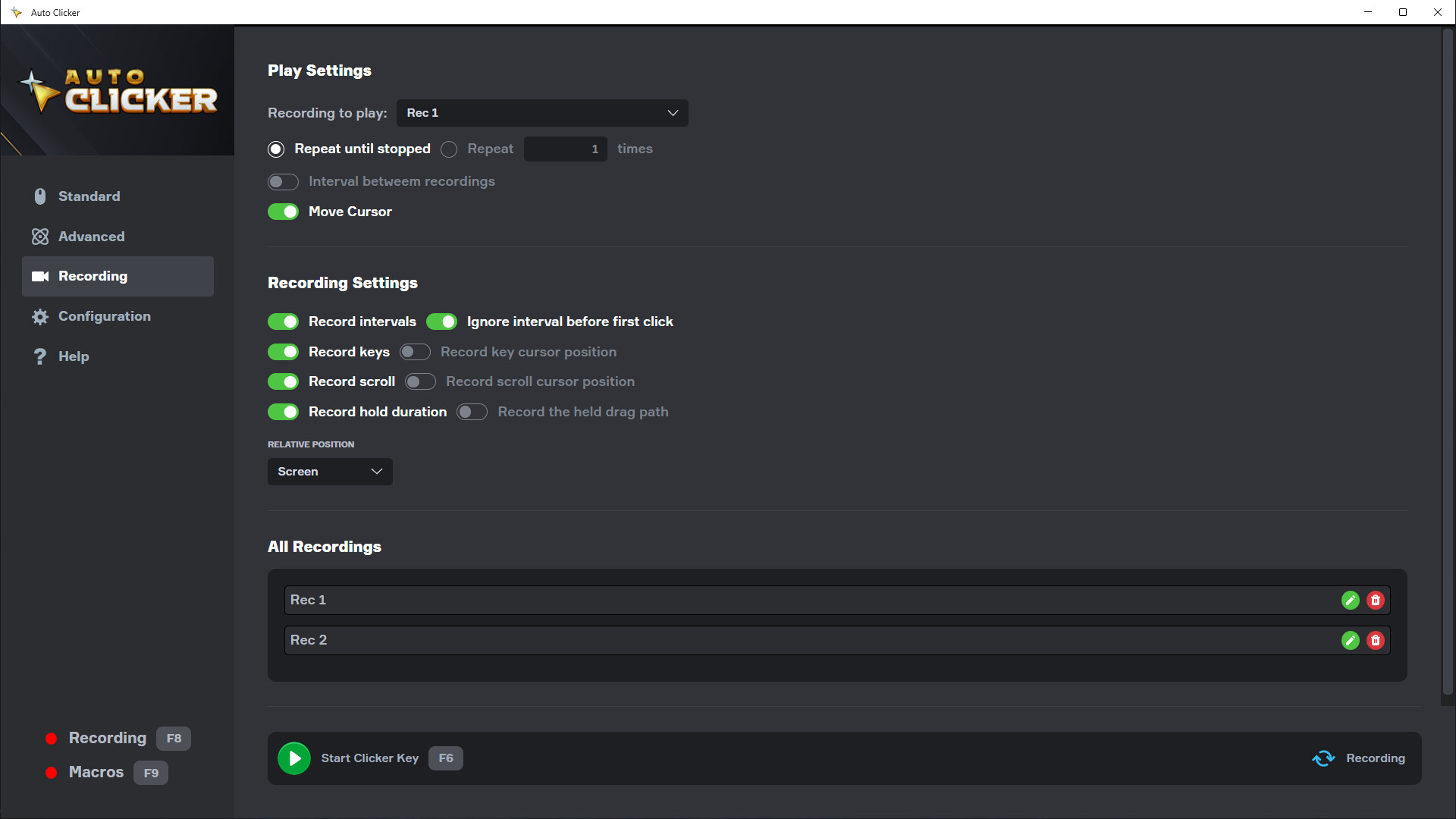
Automate your clicks with Playsaurus's trusted Auto Clicker on Steam. Auto Clicker can automate clicks and other inputs in Steam games, standalone PC titles, Windows apps, and even web games. Standard Mode Start with Standard Mode if you need a simple auto clicker that’s quick to set up: Configure intervals between clicks, including random offsets Choose your mouse button type: left, right, middle, or side Use single, double, and hold clicks Specify a fixed number of clicks or run indefinitely Click at the current cursor location, fixed coordinates, or on detected images Advanced Mode For deeper customization, Advanced Mode provides a user-friendly, drag-and-drop interface to build complex automation sequences using different types of actions: Click Action: Perform specific clicks at chosen locations Scroll Action: Simulate mouse wheel scrolling Interval Action: Insert delays between actions Repeat Action: Loop actions multiple times or until stopped Detection Action: Search for images and branch your logic Key Action: Simulate keystrokes Random Action: Randomize your actions Custom Action: Group sets of actions for reuse and organization Recordings Record all clicks, keypresses, and delays, then replay or import them into custom actions for advanced routines. Macros Assign any custom set of actions to a key, triggering complex sequences on demand. About Us Playsaurus has developed several popular clicker games including Clicker Heroes and Mr.Mine. We are also the Steam publisher of the classic game Cookie Clicker. So we are providing you a solution to the problem we created. Please enjoy! Notes: Automations like Auto Clicker may be against the terms of games and other applications, be sure to consult their terms of use Image detection may fail with scaled, distorted, or rotated images Compatible with Windows 10+
System requirementsMinimum and recommended hardware

Minimum

Minimum: OS: Windows 10 (10.0.17763.0) Processor: Intel Pentium Processors Memory: 1 GB RAM Storage: 500 MB available space Additional Notes: Memory requirements may increase if you use image detection feature.

Recommended

Recommended: OS: Windows 10 (10.0.19041.0) Processor: Intel Pentium Processors Memory: 4 GB RAM Storage: 500 MB available space Additional Notes: Memory requirements may increase if you use image detection feature.

macOS

Minimum: Requires an Apple processor OS: macOS 14 Processor: Apple Silicon Memory: 1 GB RAM Storage: 500 MB available space Additional Notes: Memory requirements may increase if you use image detection feature. Recommended: Requires an Apple processor OS: macOS 14 Processor: Apple Silicon Memory: 4 GB RAM Storage: 500 MB available space Additional Notes: Memory requirements may increase if you use image detection feature.
Supported languages32 languages
LanguageFull audio
English
French
Italian
German
Spanish - Spain
Arabic
Bulgarian
Czech
Danish
Dutch
Finnish
Greek
Hungarian
Indonesian
Japanese
Korean
Norwegian
Polish
Portuguese - Brazil
Portuguese - Portugal
Romanian
Russian
Simplified Chinese
Spanish - Latin America
Swedish
Thai
Traditional Chinese
Turkish
Ukrainian
Vietnamese
Croatian
Filipino

A blank audio cell means full audio was not marked in the returned language list.

Screenshots & trailersScreenshots and trailers

Trailers

AchievementsTotal count and selected achievements

8 achievements in total.

Show selected achievements (may contain spoilers)
Standard ModeAchievement
Advanced ModeAchievement
Recording ModeAchievement
Beginner ClickerAchievement
Intermediate ClickerAchievement
Advanced ClickerAchievement
Expert ClickerAchievement
Master ClickerAchievement

View all Steam achievements

43 developer announcements, Apr 2024 to Aug 2026 · times in UTC

August

  1. Scheduling & Other Improvements — Patch 2.1.1

    Scheduling Added a new Schedule tab. Set daily start and end times, and Auto Clicker will automatically start and stop itself at those times. Choose which mode the schedule runs. Run the schedule every day or every few days, with a start…

    Patch notes

July

  1. Performance, Stability & Admin Update - Patch 2.1.0

    This update focuses on the biggest sources of reported problems: freezes at startup and shutdown, clicks not registering in games that run as administrator, and slowdowns with large recordings and custom blocks. It also adds several…

    Patch notes

June

  1. OCR, Steam Workshop, and More — Patch 2.0.8

    CHANGES Cloud Saves with Your Playsaurus Account — Sign in and your profiles, settings, and macros sync across every device you run Auto Clicker on. Switch machines without losing a thing. Steam Workshop Support — Share your advanced-mode…

    Patch notes

November

  1. macOS Support Added - Patch 2.0.7

    🎉 We’re excited to announce that Auto Clicker is now officially available for macOS through Steam!You can now enjoy the same smooth automation experience on your Mac, whether you’re using it for games, productivity, or just to make life a…

    Patch notes

April

  1. Knowledge Base and Bugfix – Patch 2.0.6

    Changes: Added a link to our knowledge base guides on the help page. Fixed an error when using long intervals.

    Patch notes

March

  1. Update Translations – Patch 2.0.5

    Changes: Translations updated for multiple languages. Updated support page visual.

    Patch notes

February

  1. Small Changes - Patch 2.0.4

    Changes: Added an option to minimize the app while capturing click locations, images, and colors. This is now the default behavior, but you can disable it in the Configuration tab. Updated the help page with more information, especially for…

    Patch notes
  2. Showcase & Earn: Share Your Auto Clicker Experience on YouTube!

    Hello everyone we are looking for several individuals to upload a short 90 second video showing how you use our autoclicker to your youtube account. If you are selected we will provide you with a $10+ gift card, higher payments available to…

    Hershainn
  3. Toggle, Labels, and More - Patch 2.0.3

    Changes Labels for blocks in advanced mode. Toggle to enable/disable blocks in advanced mode. Option to return the cursor to its original position after executing move blocks. Recording timer and playback counter. Feature detection mode for…

    Patch notes

January

  1. Detection Capture Tools, Movement Recording, and Profile Copy - Patch 2.0.2

    Changes: Image capture for detection blocks. Color picker for detection blocks. Custom color matching mode. Gradual movement to move blocks. Drag functionality to move blocks. Option to record mouse movement without actions. Profile copy…

    Patch notes
  2. Color Detection, Move Blocks, and More - Patch 2.0.1

    Changes: Added a move block to move the cursor without clicking. Added a color matching feature for detection blocks. Improved compatibility with multiple monitors. Added a support tab with contact information.

    Patch notes

December

  1. Auto Clicker Joins Playsaurus + Version 2.0 is Here!

    {STEAM_CLAN_IMAGE}/44971386/773f773e6f3f3a46637dca5cd0be81df01be0805.png We're excited to announce that Auto Clicker, the trusted tool you've relied on, is now part of the Playsaurus family! Known for creating beloved games like Clicker…

    Hershainn

November

  1. Recording Adjustments - Patch 1.0.5

    Features Enhanced the recording functionality to register multiple keys held simultaneously. The following changes were required for the recording improvements and have been included in Advanced Mode: Added DOWN and UP options for keys and…

    Patch notes

October

  1. Random Options - Patch 1.0.4

    Features Random Block - You can now use the random block in advanced mode to execute a random block within. Added random offsets to click, scroll, and key locations. Added random offsets to hold durations for clicks and key presses.

    Patch notes
  2. Mouse Scroll and Bug Fixes - Patch 1.0.3

    Features Added "Scroll Block" to simulate the mouse wheel in advanced mode and recordings. Bug Fixes Removed the mass edit button from Custom Block when nothing is selected, as it was causing crashes. Fixed an issue where the window…

    Patch notes
  3. Detected point offset and other fixes - Patch 1.0.2

    Advanced Mode Changes In image detection, you can now add a fixed offset to the detected point location to adjust it if you don't want the click to happen at the center of the detected area. Copied blocks now appear below the original block…

    Patch notes
  4. Edit All Blocks Button and Profile Bug Fixes - Patch 1.0.1

    Advanced Mode Changes Added an option to quickly update all blocks inside. You can now quickly change the Move Cursor option and Interval. Fixed a bug where using the same custom block in multiple profiles caused visual duplication of…

    Patch notes

September

  1. Official Release of Auto Clicker

    {STEAM_CLAN_IMAGE}/44971386/c180248d4f14f1ae722882f9991dc5aaf7a5f12b.png I’m excited to announce that Auto Clicker is now officially released! I want to give a huge thank you to everyone who supported me during Early Access. Your feedback…

    Hershainn
  2. Small Changes - Patch 0.3.3

    General Changes The window size and position are now saved for when you reopen the app. Fixed a bug where dragging a custom block into itself would cause crashes. This is no longer possible. Added more information to the Help page.

    Patch notes
  3. Relative Position and Copy Functionality - Patch 0.3.2

    Advanced Mode Changes Added a copy button for blocks and macros. You can now use the "Window" relative position to base click coordinates on the window rather than the screen. This ensures that clicks occur in the same position, even if the…

    Patch notes
  4. Profiles - Patch 0.3.1

    Advanced Mode Changes Added profiles to advanced mode to make it easier to configure for multiple games/apps. Added an option to make the mouse move gradually before clicking.

    Patch notes

August

  1. Drag Click - Patch 0.3.0

    General Changes Added drag click functionality to Advanced Mode and Recording Mode.

    Patch notes
  2. Start Configurations and Small Fixes - Patch 0.2.9

    General Changes Added side button forward and back as options for click. Now you can separate the keys to start/stop for Standard, Advanced, and Recording modes. Advanced Mode Changes Fixed a visual bug where display values of the same…

    Patch notes

July

  1. Tutorial Videos - Patch 0.2.8

    General Changes Added tutorial videos to the Help tab. Advanced Mode Changes Fixed an issue where clicks would fail when multiple parallel loops executed them simultaneously. Note: Hold clicks will still block other clicks, as it's not…

    Patch notes
  2. Parallel Loops - Patch 0.2.7

    Advanced Mode Changes Added an option to have multiple parallel loops in advanced mode.

    Patch notes
  3. Dark Mode and Key Inner Blocks - Patch 0.2.6

    General Changes Added dark mode. Removed text selection outside of input fields. Advanced Mode Changes Added option to hold key for the duration of the inner blocks. Fixed bug where blocks inside detection block would not reorganize…

    Patch notes
  4. Configuration Options - Patch 0.2.5

    General Changes Added option to separate start and stop keys Added option to minimize app to system tray

    Patch notes

June

  1. Move cursor on Key Block - Patch 0.2.4

    Advanced Mode Changes Added option to move the cursor when using Key Blocks in advanced mode.

    Patch notes
  2. CPS display and Macro changes - Patch 0.2.3

    Standard Mode Changes Added CPS estimation display value in the Standard Interval to help configuration. Advanced Mode Changes Key Block now has a hold duration configuration Option to set hold binding to macro and configure if it can…

    Patch notes
  3. Mouse and hold bindings - Patch 0.2.2

    General Changes Added some mouse buttons to the bindings and included the option to set a hold bind that executes only while holding the button.

    Patch notes

May

  1. Macros - Patch 0.2.1

    General Changes Now you can create macros in advanced mode to assign custom blocks to execute when a key is pressed. Recording indicator moved to the sidebar.

    Patch notes
  2. New UI - Patch 0.2.0

    General Changes Adjusted the UI to change the logo and better fit the color scheme. Now you can expand custom blocks by clicking on them and edit them in the main loop.

    Patch notes
  3. Hold mouse button - Patch 0.1.8

    General Changes Now you can select the 'Hold' click type to keep the mouse button pressed for a specific amount of time. Added a record hold option to recordings.

    Patch notes
  4. Achievements - Patch 0.1.7

    General Changes Added steam achievements integration.

    Patch notes
  5. Image detection and UI changes - Patch 0.1.6

    General Changes UI adjustments. Fixed image detection to work with transparent pixels in PNG files.

    Patch notes
  6. Data Management - Patch 0.1.5

    General Changes An option has been added to export, import, and clear data in the configuration tab. Now you can save multiple configurations and easily share them with others.

    Patch notes
  7. Localization - Patch 0.1.4

    General Changes Now you can select the app language in the configurations tab. Currently, only English and Portuguese have been fully revised; all other languages have been automatically translated. I'll work on revising them in the future…

    Patch notes
  8. Enable Key Modifiers - Patch 0.1.3

    General Changes Now there's support for key modifiers for Key Blocks and Recordings.

    Patch notes
  9. Region of interest and other tweaks - Patch 0.1.1

    General Changes Now you can select a region of interest for image detection, reducing the area to search and improving processing speed. Added more information to the help page. UI improvements. Recording Mode Changes Added a move cursor…

    Patch notes
  10. Recording Feature - Patch 0.1.0

    Recording Feature Now you can press the recording button, or press the recording key, to start recording all your clicks, keypresses and the interval between them. You can also create a custom block using the recording to use it in the…

    Patch notes

April

  1. Interval improvements and other tweaks

    General Changes Improved interval accuracy. Added an option to click without moving the mouse cursor (the click might not register on some applications that check the cursor position). Fixed a bug where the clicker would not stop during the…

    Patch notes
  2. Standard Mode Tweaks

    Standard Mode Changes Added toggle for interval. Added configurable delay between fixed and image-find clicks.

    Patch notes
  3. Release Patch

    Advanced Mode Changes Added custom blocks. Improvements on key block so it works on more applications. Fixed bug where main loop would not save correctly. Fixed bug when using multiple detection blocks.

    Patch notes

All games on this site