STEAMDB NEXUS

Steam app 1068820 · updated 11 Oct 2026, 14:24 UTC

OVR Toolkit - Desktop Overlay

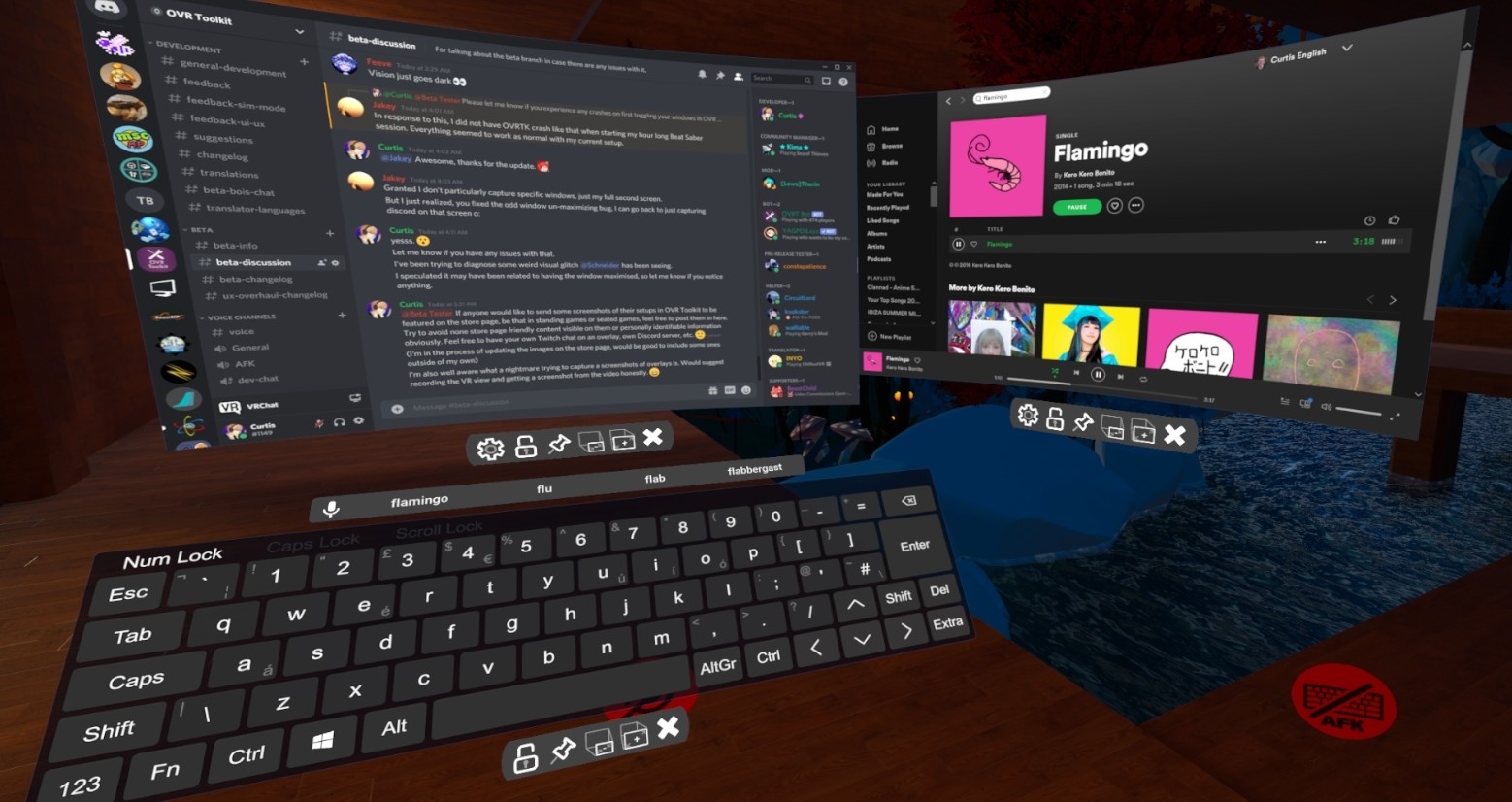
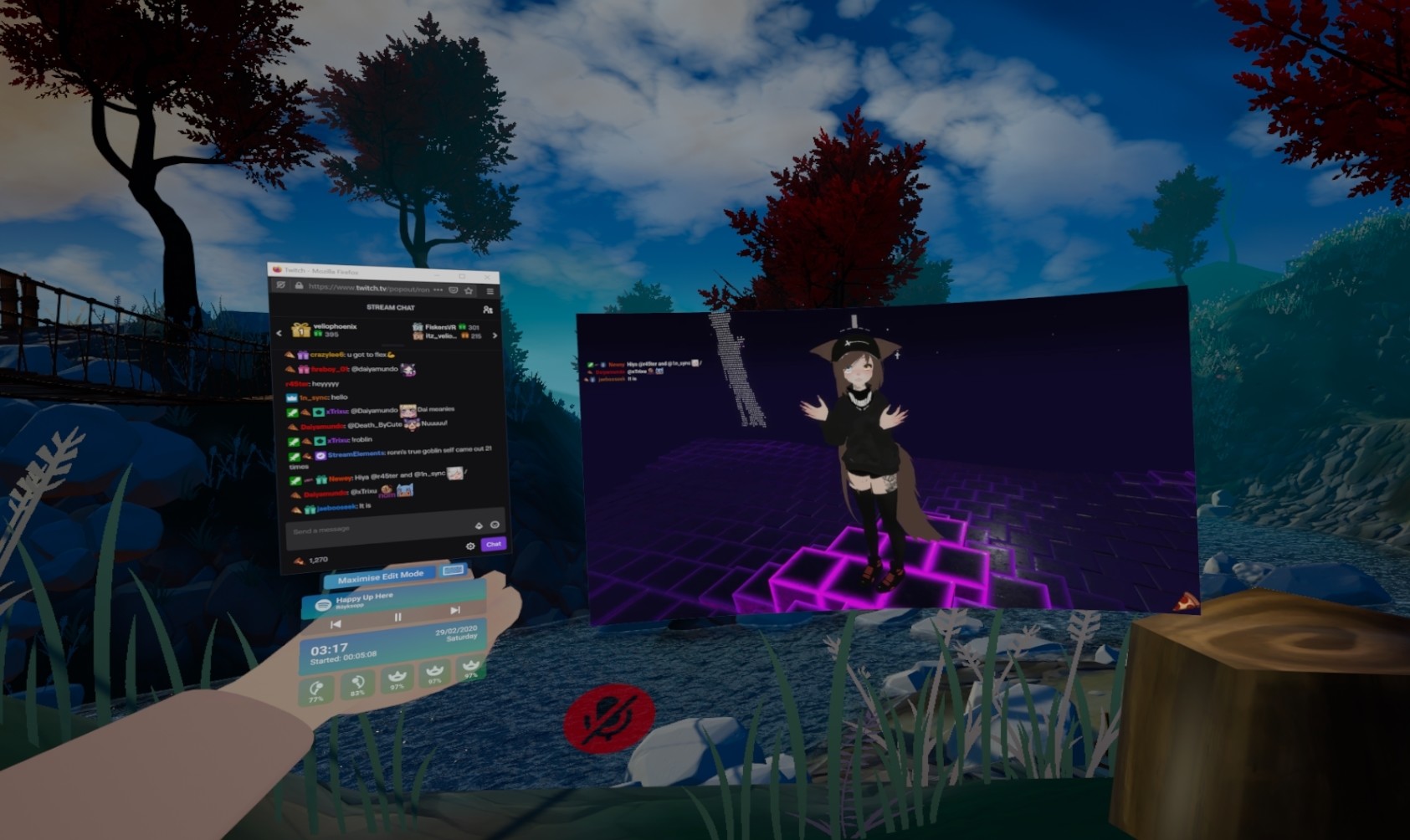
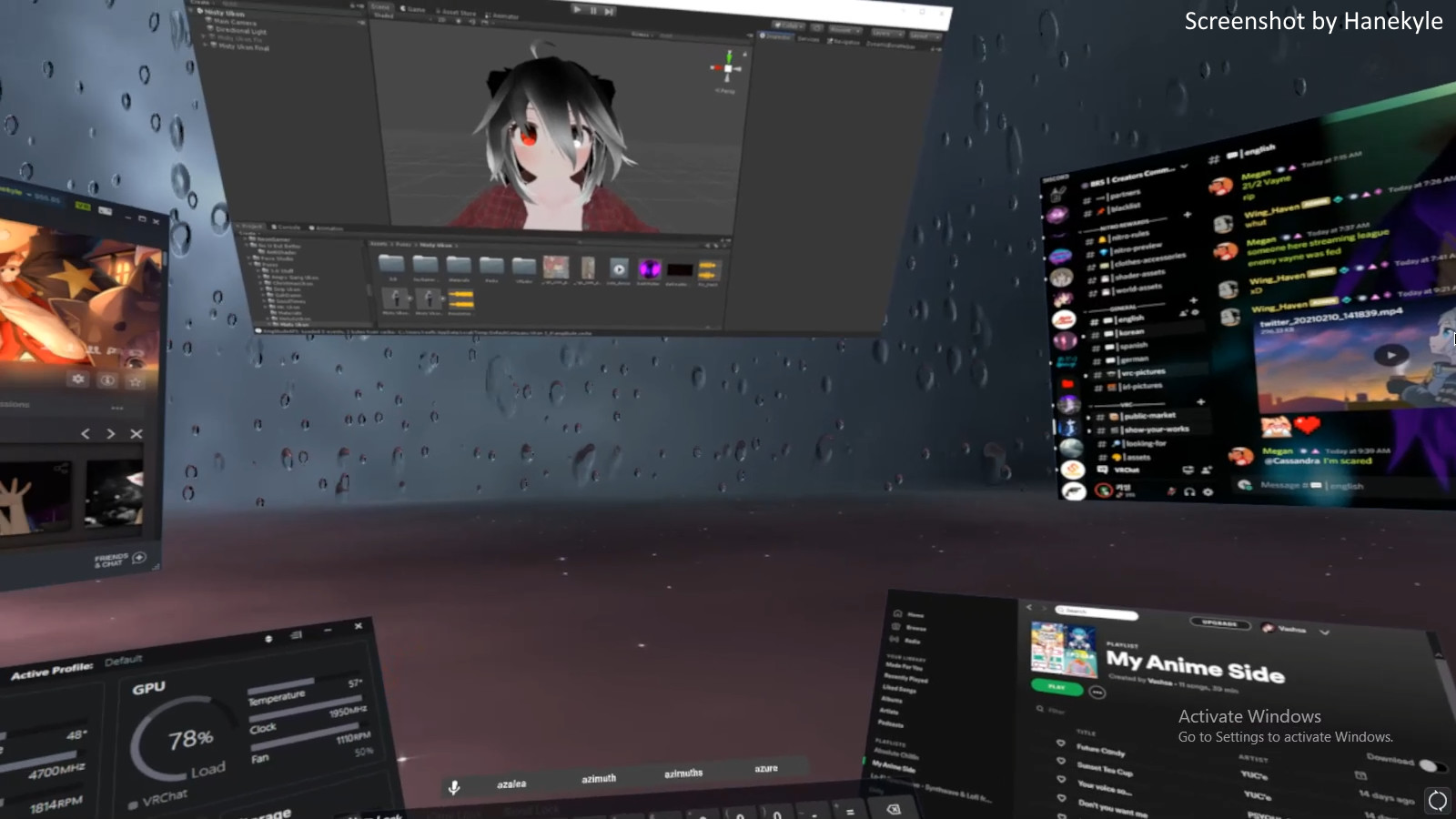
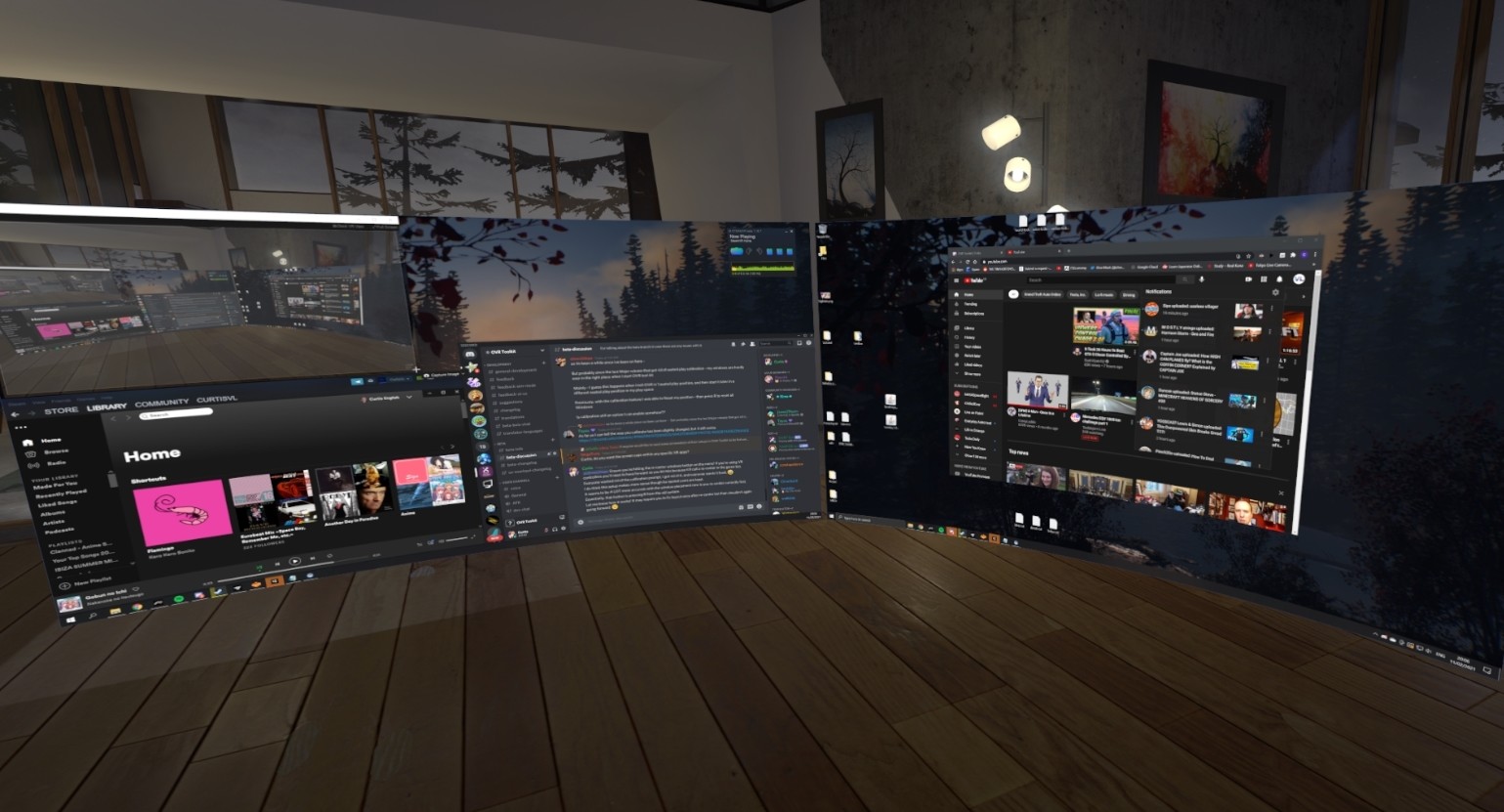
OVR Toolkit is a utility application designed to make viewing the desktop in VR simple and fast, it allows for viewing the desktop within VR, mouse input, typing with a virtual keyboard, and quickly switching between windows. You can also control your media, see time, and more!

OVR Toolkit - Desktop Overlay Steam header artwork
Curtis EnglishVoxelLoop Software Limited
2,240playing now
2,27524-hour peak
5,073all-time peak
1,772average, last 30 days

The last 30 days

+25.5Gain+1.46%% gain3,672Peak

716 hourly samples, with the daily peak drawn over them. Weekends are shaded.

09912k3k4k16 Sep21 Sep26 Sep01 Oct06 Oct11 Oct16 OctWednesday 16 September 20261,888 peakThursday 17 September 20262,230 peakFriday 18 September 20262,311 peakSaturday 19 September 20263,334 peakSunday 20 September 20263,672 peakMonday 21 September 20262,545 peakTuesday 22 September 20262,291 peakWednesday 23 September 20262,062 peakThursday 24 September 20262,321 peakFriday 25 September 20262,366 peakSaturday 26 September 20263,373 peakSunday 27 September 20263,507 peakMonday 28 September 20262,569 peakTuesday 29 September 20262,365 peakWednesday 30 September 20262,150 peakThursday 01 October 20262,412 peakFriday 02 October 20262,385 peakSaturday 03 October 20263,315 peakSunday 04 October 20263,538 peakMonday 05 October 20262,600 peakTuesday 06 October 20262,302 peakWednesday 07 October 20262,039 peakThursday 08 October 20262,399 peakFriday 09 October 20262,344 peakSaturday 10 October 20263,075 peakSunday 11 October 20263,546 peakMonday 12 October 20262,761 peakTuesday 13 October 20262,383 peakWednesday 14 October 20261,983 peakThursday 15 October 20262,110 peakFriday 16 October 20262,275 peak
Daily peakEvery hourly sample

All time

89 months, June 2019 to October 2026. The highest number of people in the game at once, each month, on a time axis -- a gap in the record stays a gap.

01k3k4k5k2019202020212022202420252026June 201915 monthly peakJuly 20191,434 monthly peakAugust 2019144 monthly peakSeptember 2019175 monthly peakOctober 2019238 monthly peakNovember 2019198 monthly peakDecember 2019249 monthly peakJanuary 2020319 monthly peakFebruary 2020297 monthly peakMarch 2020396 monthly peakApril 2020418 monthly peakMay 2020490 monthly peakJune 2020476 monthly peakJuly 2020538 monthly peakAugust 2020547 monthly peakSeptember 2020539 monthly peakOctober 2020550 monthly peakNovember 2020665 monthly peakDecember 2020662 monthly peakJanuary 2021921 monthly peakFebruary 2021867 monthly peakMarch 2021915 monthly peakApril 20211,046 monthly peakMay 20211,022 monthly peakJune 20211,011 monthly peakJuly 20211,097 monthly peakAugust 20211,097 monthly peakSeptember 20211,129 monthly peakOctober 20211,152 monthly peakNovember 20211,210 monthly peakDecember 20211,117 monthly peakJanuary 20221,750 monthly peakFebruary 20221,426 monthly peakMarch 20221,377 monthly peakApril 20221,332 monthly peakMay 20221,360 monthly peakJune 20221,316 monthly peakJuly 20221,305 monthly peakAugust 20221,251 monthly peakSeptember 20221,279 monthly peakOctober 20221,274 monthly peakNovember 20221,353 monthly peakDecember 20221,657 monthly peakJanuary 20231,887 monthly peakFebruary 20231,534 monthly peakMarch 20231,513 monthly peakApril 20231,542 monthly peakMay 20231,464 monthly peakJune 20231,555 monthly peakJuly 20231,518 monthly peakAugust 20231,484 monthly peakSeptember 20231,555 monthly peakOctober 20231,705 monthly peakNovember 20231,613 monthly peakDecember 20231,523 monthly peakJanuary 20242,099 monthly peakFebruary 20241,718 monthly peakMarch 20242,047 monthly peakApril 20242,095 monthly peakMay 20242,056 monthly peakJune 20242,144 monthly peakJuly 20241,950 monthly peakAugust 20241,951 monthly peakSeptember 20242,117 monthly peakOctober 20241,986 monthly peakNovember 20241,963 monthly peakDecember 20241,923 monthly peakJanuary 20252,560 monthly peakFebruary 20252,150 monthly peakMarch 20252,067 monthly peakApril 20254,284 monthly peakMay 20253,887 monthly peakJune 20253,785 monthly peakJuly 20253,801 monthly peakAugust 20253,972 monthly peakSeptember 20253,930 monthly peakOctober 20253,915 monthly peakNovember 20253,815 monthly peakDecember 20253,735 monthly peakJanuary 20265,073 monthly peakFebruary 20264,059 monthly peakMarch 20264,359 monthly peakApril 20264,248 monthly peakMay 20264,081 monthly peakJune 20264,348 monthly peakJuly 20263,849 monthly peakAugust 20263,749 monthly peakSeptember 20263,672 monthly peakOctober 20263,546 monthly peak
Monthly peak

The last four months

Show:

The highest number of people in the game at once, each month. Four, because four is as far back as the source keeps anything finer than one figure a month.

01k2k3k4kJuly 2026August 2026September 2026October 2026July 20263,849 peak — daily detail belowAugust 20263,749 peak — daily detail belowSeptember 20263,672 peak — hourly detail belowOctober 20263,546 peak — hourly detail below
Monthly peakHas finer data

July 2026

14 days, each one the highest figure that day. The source keeps no hourly detail this far back. Weekends are shaded.

01k2k3k4k01 Jul20 Jul22 Jul24 Jul26 Jul28 Jul30 JulWednesday 01 July 20263,849 peakSunday 19 July 20263,679 peakMonday 20 July 20262,853 peakTuesday 21 July 20262,697 peakWednesday 22 July 20262,388 peakThursday 23 July 20262,564 peakFriday 24 July 20262,551 peakSaturday 25 July 20263,564 peakSunday 26 July 20263,849 peakMonday 27 July 20262,824 peakTuesday 28 July 20262,618 peakWednesday 29 July 20262,443 peakThursday 30 July 20262,437 peakFriday 31 July 20262,642 peak

August 2026

31 days, each one the highest figure that day. The source keeps no hourly detail this far back. Weekends are shaded.

01k2k3k4k01 Aug06 Aug11 Aug16 Aug21 Aug26 Aug31 AugSaturday 01 August 20263,677 peakSunday 02 August 20263,692 peakMonday 03 August 20262,610 peakTuesday 04 August 20262,640 peakWednesday 05 August 20262,313 peakThursday 06 August 20262,658 peakFriday 07 August 20262,439 peakSaturday 08 August 20263,505 peakSunday 09 August 20263,684 peakMonday 10 August 20262,692 peakTuesday 11 August 20262,486 peakWednesday 12 August 20262,168 peakThursday 13 August 20262,230 peakFriday 14 August 20262,438 peakSaturday 15 August 20263,534 peakSunday 16 August 20263,749 peakMonday 17 August 20262,671 peakTuesday 18 August 20262,551 peakWednesday 19 August 20262,204 peakThursday 20 August 20262,347 peakFriday 21 August 20262,398 peakSaturday 22 August 20263,319 peakSunday 23 August 20263,658 peakMonday 24 August 20262,579 peakTuesday 25 August 20262,442 peakWednesday 26 August 20262,235 peakThursday 27 August 20262,471 peakFriday 28 August 20262,525 peakSaturday 29 August 20263,509 peakSunday 30 August 20263,722 peakMonday 31 August 20262,625 peak

September 2026

30 days as the curve, each the highest figure that day. Behind it, 353 hourly samples from 16 Sep, which is as far back as the source keeps every hour. Weekends are shaded.

09912k3k4k01 Sep06 Sep11 Sep16 Sep21 Sep26 SepTuesday 01 September 20262,406 peakWednesday 02 September 20262,176 peakThursday 03 September 20262,286 peakFriday 04 September 20262,376 peakSaturday 05 September 20263,247 peakSunday 06 September 20263,434 peakMonday 07 September 20262,982 peakTuesday 08 September 20262,524 peakWednesday 09 September 20262,043 peakThursday 10 September 20262,285 peakFriday 11 September 20262,030 peakSaturday 12 September 20262,923 peakSunday 13 September 20263,175 peakMonday 14 September 20262,155 peakTuesday 15 September 20262,195 peakWednesday 16 September 20261,956 peakThursday 17 September 20262,230 peakFriday 18 September 20262,311 peakSaturday 19 September 20263,334 peakSunday 20 September 20263,672 peakMonday 21 September 20262,545 peakTuesday 22 September 20262,291 peakWednesday 23 September 20262,062 peakThursday 24 September 20262,321 peakFriday 25 September 20262,366 peakSaturday 26 September 20263,373 peakSunday 27 September 20263,507 peakMonday 28 September 20262,569 peakTuesday 29 September 20262,365 peakWednesday 30 September 20262,150 peak

October 2026

16 days as the curve, each the highest figure that day. Behind it, 364 hourly samples. Each dip is a night. Weekends are shaded.

09572k3k4k01 Oct03 Oct05 Oct07 Oct09 Oct11 Oct13 Oct15 OctThursday 01 October 20262,412 peakFriday 02 October 20262,385 peakSaturday 03 October 20263,315 peakSunday 04 October 20263,538 peakMonday 05 October 20262,600 peakTuesday 06 October 20262,302 peakWednesday 07 October 20262,039 peakThursday 08 October 20262,399 peakFriday 09 October 20262,344 peakSaturday 10 October 20263,075 peakSunday 11 October 20263,546 peakMonday 12 October 20262,761 peakTuesday 13 October 20262,383 peakWednesday 14 October 20261,983 peakThursday 15 October 20262,110 peakFriday 16 October 20262,275 peak
Nothing here is interpolated or estimated; where a sample is missing the line is broken.

Game information

Updated 11 Oct 2026, 14:24 UTC
App ID
1068820
Last updated
05 Oct 2026 build 25682991
Update pace
Occasional updates patched now and then · 3 in 34 days watched
Developer
Curtis English
Publisher
VoxelLoop Software Limited
Release date
Jun 28, 2019
Platforms
Windows
Download size
315 MB
Install size
1.00 GB
Genres
Utilities
Game modes
Controller support
Partial

Features & support

Steam features

VR OnlySteam Workshop

Controllers & input

Tracked Controller SupportPartial Controller Support

Accessibility

Popular tags

UtilitiesVRSoftware
About this gameFull description from Steam
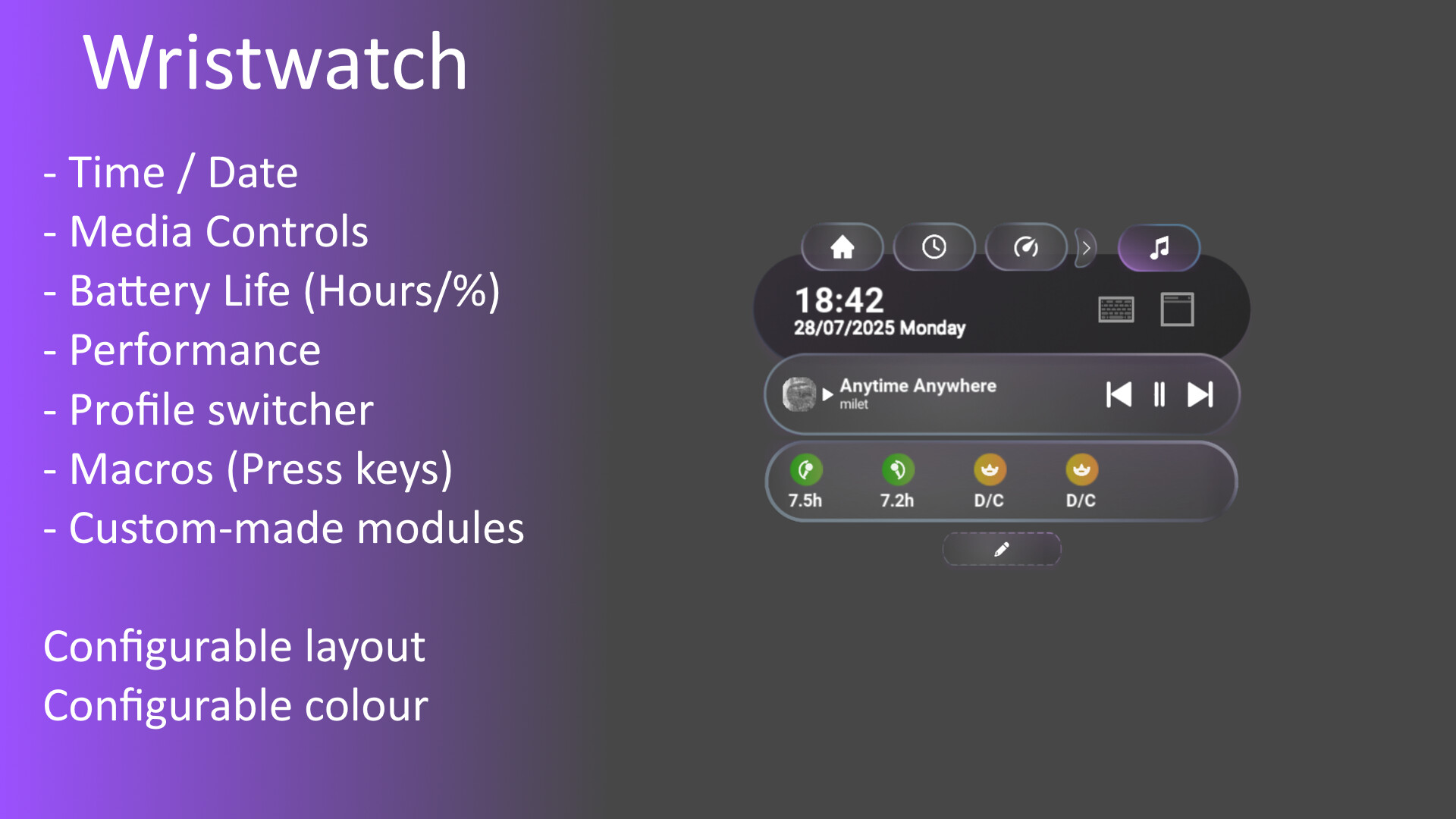
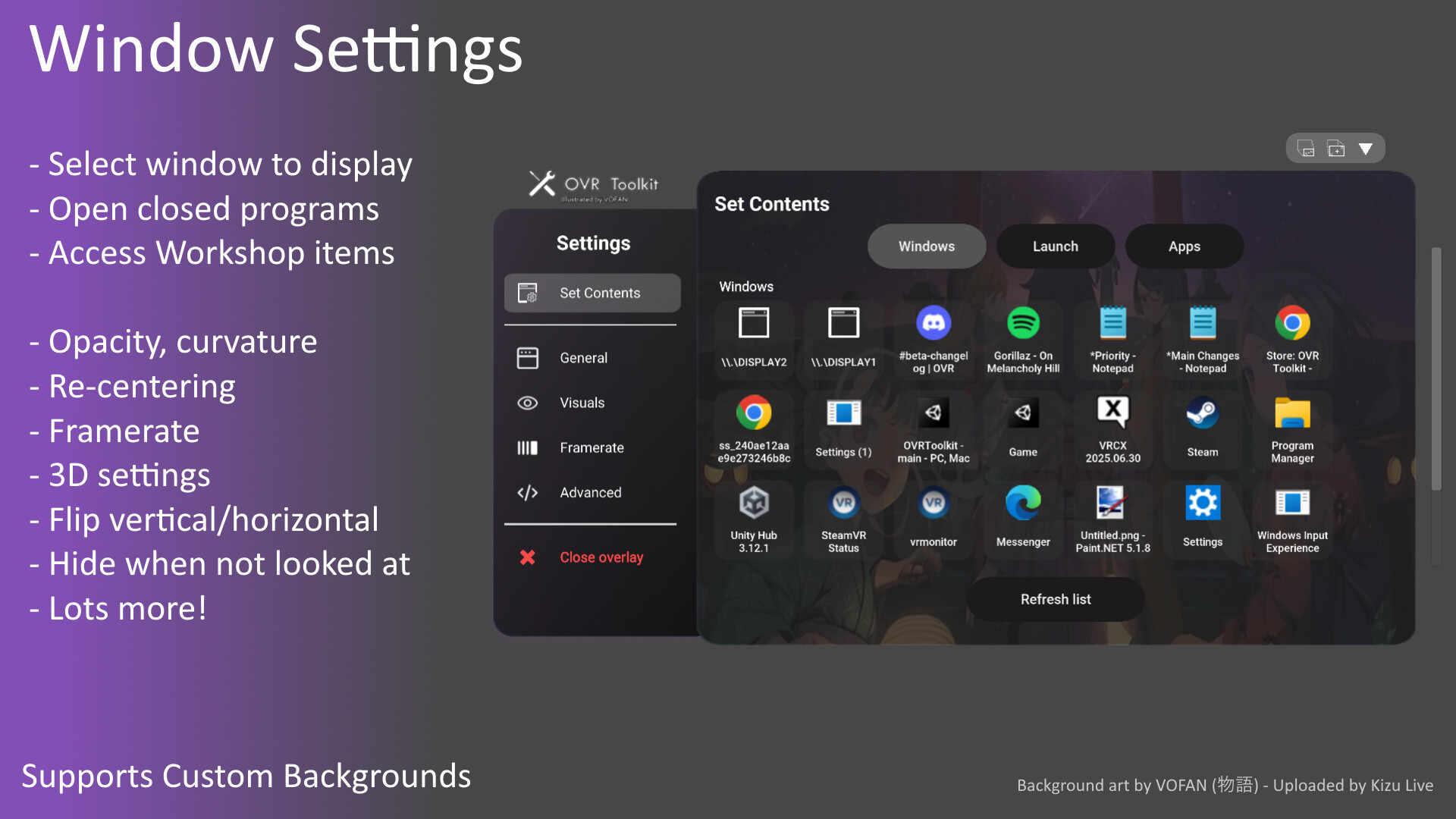
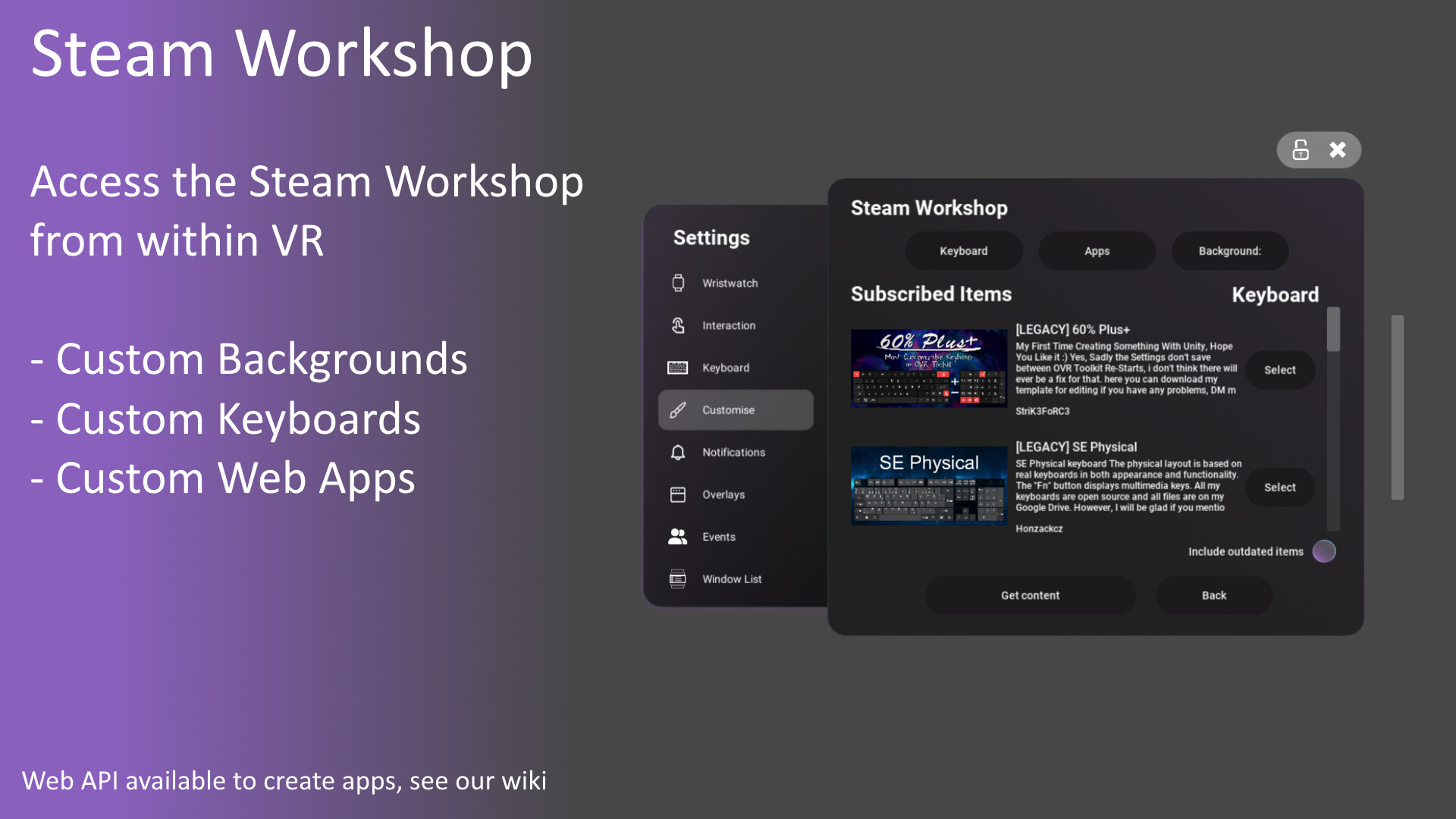
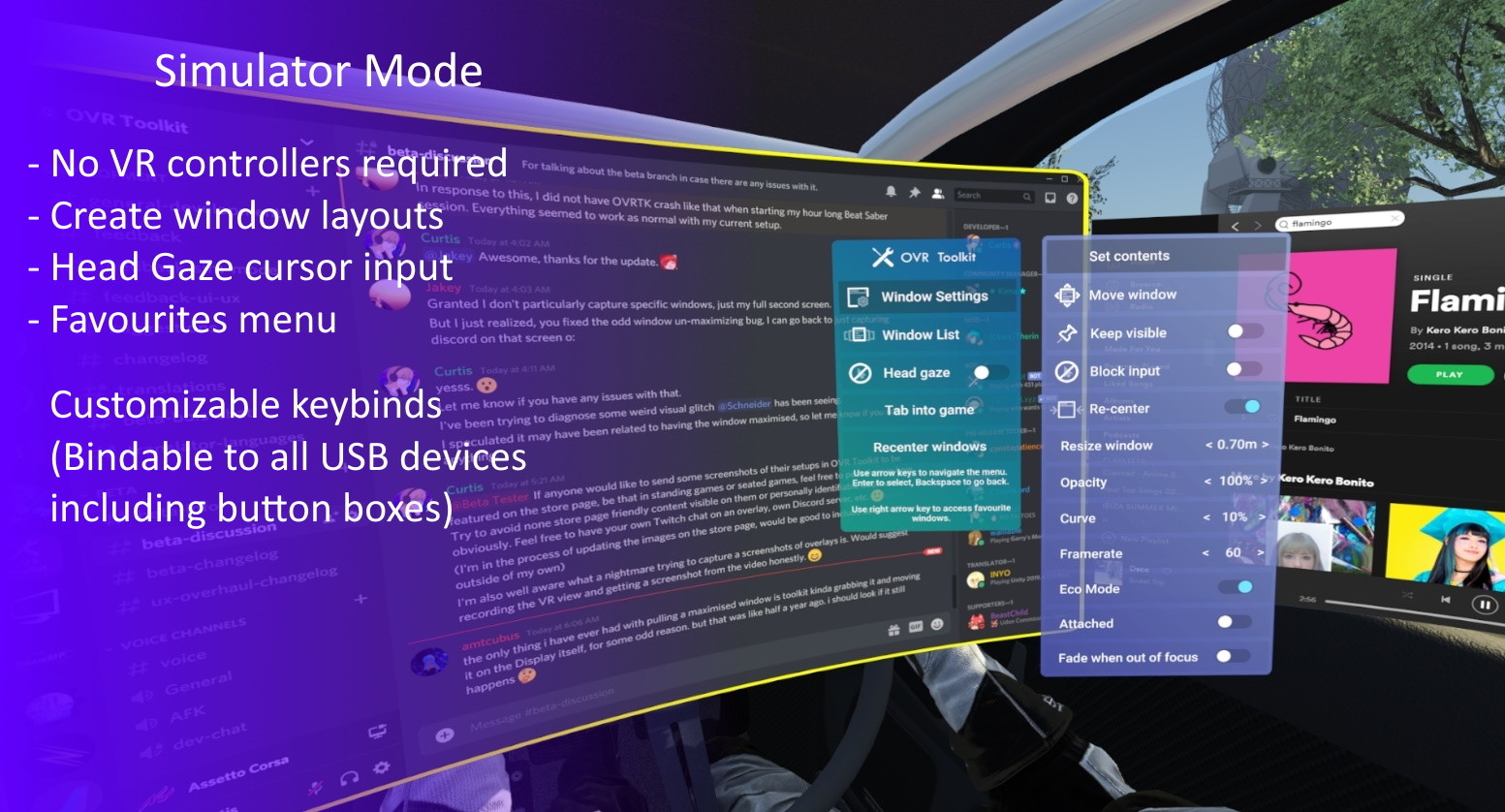
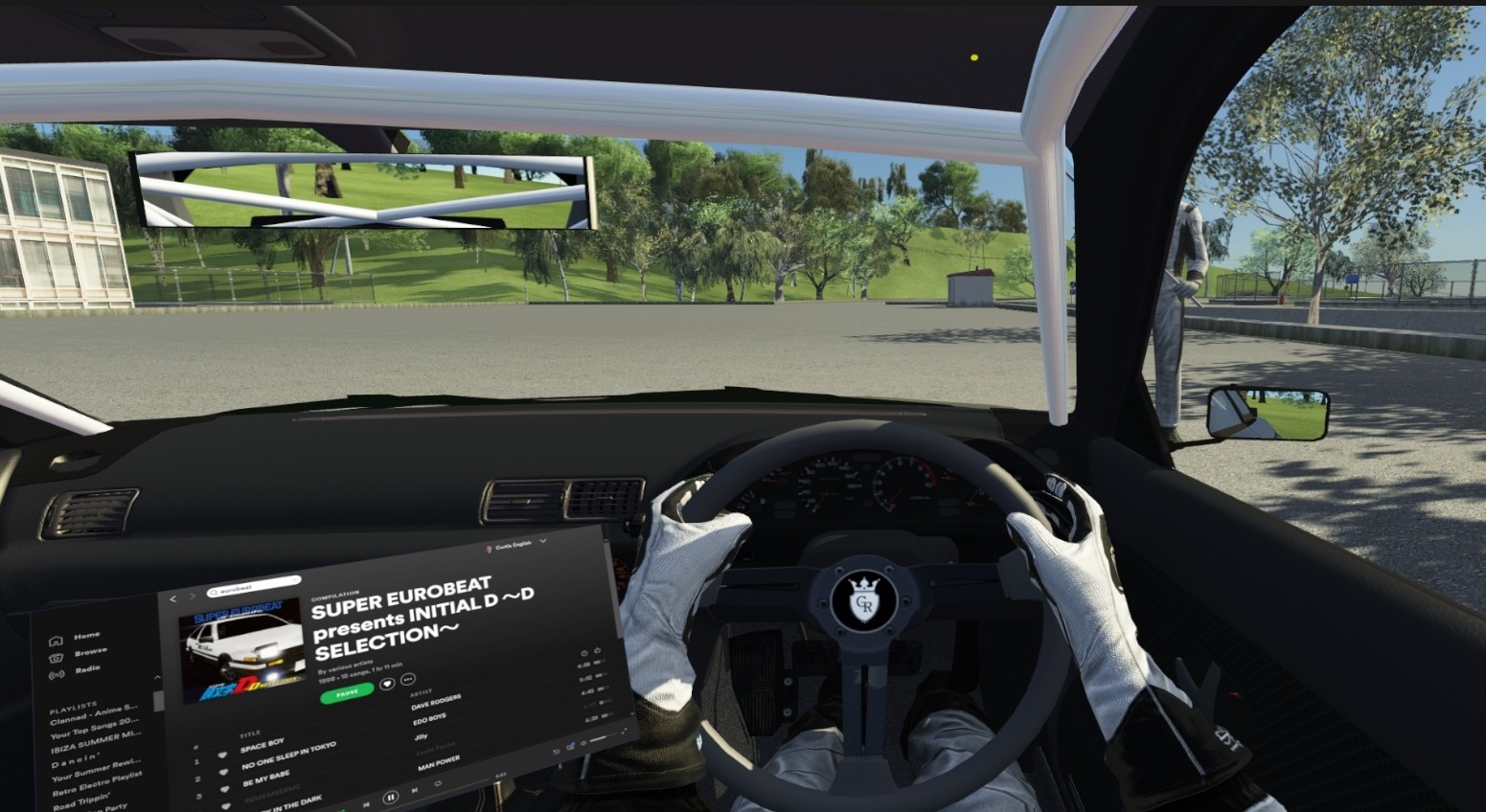
Please read this section before purchasing! OVR Toolkit only supports Windows 10 and 11 OVR Toolkit requires you to have a Windows account with admin permissions and that you run Steam on this same account Standalone headset users - Read the 'Important Stuff' section before purchase! Overview OVR Toolkit is a SteamVR Overlay utility designed to make viewing the desktop within VR easy and intuitive. OVR Toolkit allows you to display specific desktop windows, quickly select between them, use intuitive controls to navigate those windows, and use a virtual keyboard to type. Ever wanted to reply to Discord messages without taking off your headset or looking through a nose piece? Ever wanted to pause that song you're listening to without fumbling around on your keyboard? Now you can with ease! OVR Toolkit is compatible with all SteamVR compatible headsets, such as all Meta headsets, Steam Frame, Valve Index, etc. (Note: Games must be running through SteamVR for OVR Toolkit to be usable, games running on the headset itself are not supported!) Features Overlays over almost all SteamVR applications: OVR Toolkit will display on top of all your favorite titles! (VRChat, Beat Saber, etc.) Desktop window viewing: Allows you to select a desktop window and display it above your hand, or pin it in the world around you. Multiple desktop windows: Create multiple different windows and place them in the world around you. Attach windows to tracked devices: You can make windows move around with either your left or right controllers, headset, or have them stationary in the world. Curved overlays: Want to improves readability of large windows in VR by wrapping them around you by a configurable amount? Now you can! (Or you can make the window into a wall by curving it to the max, I don't judge!) Window re-centering: This feature will make window's re-appear in front of you when you turn them on regardless of your position in your play space. This is useful for users who move around a lot in VR, such as standing/sitting/lying down! Intuitive desktop input: Scroll up and down on windows by dragging, make a selection by dragging, pinch with both controllers to zoom content, like using your finger on a phone but with a VR controller instead! (This makes a lot more sense than it sounds like it does!) Wristwatch: An overlay displayed on your hand that displays the time, date, device battery percentages, as well as other values such as CPU/GPU/VRAM usage. Battery time remaining estimates: Prefer to know how many hours of charge you have left instead of what percentage? OVR Toolkit will learn and adapt its knowledge of your devices with each charge cycle to better predict the remaining time, providing a 1 hour and a 30 minutes remaining warning. (Note: Requires a full charge cycle of your devices before this data is available) Saving/Loading layouts: Like that sweet setup you've made? Well, now you can save it, and load it again next time you launch! Save multiple layouts: Want different layouts for different games? Who am I to judge!? Advanced settings for window capture: Want that 60 FPS window capture experience? Want to make a window slightly transparent so it's less in the way? Want a window to disappear when you're not looking at it? Or when it's past a set distance from you? You can do these with our advanced settings! Adaptive Framerate: When enabled, performance mode will lower the capture rate of windows you are not using, this helps game performance by decreasing the resource usage of OVR Toolkit whilst still keeping your desktop smooth when you're actually using it. Media controls: Shows now playing track, album art, progress in the song, with buttons for previous, pause/play, and skip. Supports any media player that appears in the Windows now playing section. (Spotify, web browsers, Foobar, WinAMP with a plugin, VLC, etc.) Windows notifications: Display your Windows notifications in VR such as Discord messages, 'Your Phone' notifications, and anything else that would typically appear on your desktop as a push notification. Macros: Create macro keybinds which can be activated by a click on the wrist to trigger a series of key presses. (Such as changing OBS scenes, muting/un-muting Discord, etc.) Paste to Game: Clicking the Paste button found under the keyboard will automatically tab in the currently running game and push Ctrl and V. (Can be used to paste links into VRChat video players, paste join codes into codes, etc.) VRChat integration OSC parameters: Show when your windows are toggled on, your battery levels, and a bunch more. Check our wiki! Media to chatbox: Show what song you're currently listening to, with a configurable time for how long this is visible to keep it out of the way! Keyboard to chatbox: Type to the VRChat chatbox with the OVR Toolkit keyboard. Voice Input to chatbox: Use the free voice input in OVR Toolkit to type into the chatbox. Supports 'Constant transcribe' which will keep voice input active even with the OVR Toolkit keyboard turned off. (Helpful for others who are hard-of-hearing!) Play media in loading screens: OVR Toolkit can automatically play your media when you're in a VRChat loading screen, then pause again after the loading screen ends. (Will continue to play if you started the media before the loading screen) (Find these features in Settings > Customise) Customization Customize keyboard layouts! All keyboard layouts are community made within Unity and documentation is provided so you can do this yourself. (Want the keys to spell out funny things like you're in high school again? Now you can!) Custom Apps allow web developers to integrate web apps into OVR Toolkit, allowing for integrated Twitch chat and games to be made. Module plugins allow .NET/C# developers to directly integrate with OVR Toolkit and display content as a 'module' on the wristwatch. Simulator Mode - Controller-free mode 'Simulator Mode' is a controller-free mode available in OVR Toolkit. In this mode, you can interact with windows using head gaze, and use keyboard binds to move windows around you and change their settings. This mode is perfect for those intending to use OVR Toolkit at a desk or whilst in a sim racing/driving/piloting game! (This mode is still a work in progress, provide feedback in the OVR Toolkit Discord!) Move windows with keyboard binds when you have no controllers connected. Control your cursor position with your head using head-gaze input. Pin windows around you in your play space to view whilst in games. (Race overlays, etc.) Quickly toggle open windows with the 'Edit Mode' bind to show/hide some applications such as Discord, web browsers, etc. whilst in games. 'Voice Attack' ready. (All controls are easily repeatable with the same keyboard key presses to support Voice Attack) Bindable voice input key using Google Speech to type out a sentence into a text box you have selected. Important stuff you should know about We've tried our best to make OVR Toolkit support everything, but that just isn't how this world works! Please read these compatibility notes in mind before purchasing: OVR Toolkit works best when launched as admin, without this, some applications cannot be captured or interacted with. You need to be logged in to the admin account on your PC to run OVR Toolkit as admin. If you don't have the admin account you can still sue OVR Toolkit without admin of course! OVR Toolkit only supports Windows 10 and 11, but simply works better with Windows 11 due to Microsoft updating many of the APIs we make use of to remove bugs in them. Be sure to launch OVR Toolkit through Steam, not other game launchers. You can set OVR Toolkit to auto-start with SteamVR by referring to our wiki! Meta/Oculus users, refer to the OVR Toolkit wiki 'Oculus' page for how to make OVR Toolkit appear in your games if they don't automatically run through SteamVR. (OpenVR) We cannot display our application over Oculus/Meta SDK games or OpenXR games not using the SteamVR OpenXR runtime. (Our application uses SteamVR/OpenVR to display, no one but Steam provides a way for us to display overlays right now!) If you have any issues with the application or find other compatibility issues, don't hesitate to contact us! We'll whip up a hotfix ASAP!
Content & age ratings2 regional ratings

Regional ratings

DEJUSl
IGRS3
System requirementsMinimum and recommended hardware

Minimum

Minimum: Requires a 64-bit processor and operating system OS: Windows 10 / 11 Processor: Core i5 / Ryzen 3 Memory: 4 GB RAM Graphics: GPU with 6GB VRAM or higher (GTX 1060 6GB) - This number is for running OVR Toolkit alongside a VR game DirectX: Version 11 Storage: 800 MB available space VR Support: SteamVR. (Meta Quest series, Valve Index, Steam Frame, etc. - Not stand-alone) Additional Notes: Windows 7/8 is unsupported. Later versions of 8.1 may work.

Recommended

Recommended: Requires a 64-bit processor and operating system OS: Windows 10 / 11 Processor: Core i7 / Ryzen 5 Memory: 4 GB RAM Graphics: GPU with 8GB VRAM or higher (GTX 1080 8GB, RTX 2070) - This number is for running OVR Toolkit alongside a VR game DirectX: Version 11 Storage: 800 MB available space VR Support: SteamVR. (Meta Quest series, Valve Index, Steam Frame, etc. - Not stand-alone) Additional Notes: Windows 7/8 is unsupported. Later versions of 8.1 may work.

macOS

Minimum: Recommended:

Linux

Minimum: Recommended:
Supported languages14 languages
LanguageFull audio
English
Japanese
Korean
Czech
German
Simplified Chinese
Traditional Chinese
Portuguese - Portugal
French
Spanish - Spain
Dutch
Finnish
Portuguese - Brazil
Russian

A blank audio cell means full audio was not marked in the returned language list.

Screenshots & trailersScreenshots and trailers
AchievementsTotal count and selected achievements

50 developer announcements, Jan 2022 to Oct 2026 · times in UTC

October

  1. Changelog for 05-10-2026

    05-10-2026Added window edge snapping. (Can be turned off in Settings > Overlay)Added smooth window movement. (Can be turned off in Settings > Overlay)Unified movement logic so all movable overlays have the same feel.Fixed a toggle issue…

    CurtisVL

September

  1. Changelog for 20-09-2026

    20-09-2026:Implemented new battery estimation that should now work with Tundra trackers, SlimeVR trackers, and devices powered by AA batteries such as Touch controllers. (This will cause 'Calibrating battery monitoring' to be visible on the…

    Patch notes
  2. Can't see your overlays? Blurry overlays?

    Hi all,The latest SteamVR public branch update has some issue it seems, they've been informed and I'm working to provide them with info from users experiencing these issues.If you're having these issues and would like to help out, feel free…

    CurtisVL
  3. Changelog for 03-09-2026

    03-09-2026Added:Added 'Window toggle' binding settings to Settings > Overlay to select between left hand binding, right hand, both together, or either hand to toggle windows.Battery levels should now appear when using Standable: Full Body…

    CurtisVL

June

  1. Changelog for 26-06-2026

    26-06-2026Critical bug fix (Absolutely diabolical oversight) for a window save retry loop that would compound over time eventually leading to an application crash. (This same code was in OVRT like 3 years ago and was an equally diabolical…

    Patch notes
  2. Changelog for 07-06-2026

    07-06-2026Speech Recognition changes: Google Cloud voice recognition will now wait 4 seconds before ending listening, to avoid cutting off for pauses mid-sentence.Implemented further improvements to ensure speech recognition cannot continue…

    CurtisVL

March

  1. Changelog for 04-03-2026

    04-03-2026:Google Cloud voice recognition will now wait 4 seconds before ending listening, to avoid cutting off for pauses mid-sentence.Misc improvements to ensure reliability of OSC.smól changes. ^^

    Patch notes

February

  1. Changelog for 05-02-2026

    05-02-2026:OVR Toolkit now randomizes its OSCQuery TCP/UDP ports to avoid conflict with other applications. (oops - Thanks for reporting this Ely Chan!)FIxed OVR Toolkit not correctly setting the OSCQuery service name. (This was related to…

    Patch notes

October

  1. Changelog for 06-10-2025

    06-10-2025Updated OVR Toolkit's Unity version in par with Unity guidance to prevent a Unity security vulnerability.Implemented new built-in web browser to replace the existing browser. (More modern Chromium, touch scroll support, and…

    Patch notes

September

  1. Changelog for 09-09-2025

    This update bumps the OpenVR (SteamVR) SDK to the latest version, please ensure you are not using any SteamVR beta branches besides the 'beta' branch to ensure this version is supported!Apologies for any issues caused but we should always…

    Patch notes

July

  1. Changelog for 28-07-2025 (UI Update)

    Hi everyone! The time has come! The 'early 2025' UI update!WristwatchThe wristwatch has been re-designed to be more modern, readable, and less cluttered. You can also now pin infinite modules to the watch.Battery info will show 5 devices by…

    CurtisVL

April

  1. Changelog for 08-04-2025

    Hi everyone, You may find it asks to install .NET Runtime 8 on first startup, this is required for our new launcher which is not fully implemented yet and only used for the installation process at the moment. That's the main purpose of this…

    Patch notes

September

  1. Changelog for 11-09-2024

    11-09-2024: Added: - Added build version to Global Settings. (Bottom near the credits) Changes: - Removed legacy 'Spotify window title' method of getting media information as this is now totally replaced by the Windows Media API. - Improved…

    CurtisVL

June

  1. Changelog for 16-06-2024

    16-06-2024 Bug fixes: - Fixed a Windows 10 specific log spam. (Oops) - Fixed HMD icon becoming left controller icon after reconnecting the HMD. - Fixed an issue where old Windows notifications would appear in VR on app startup.

    Patch notes

March

  1. Changelog for 28-03-2024

    28-03-2024 Changes: - Re-styled notifications, they now consider accent colour as well! - Wristwatch will now show album art when available. Bug fixes: - Notifications will now queue correctly instead of having the text of a previous…

    Patch notes

December

  1. Changelog for 11-12-2023

    11-12-2023 Added: Added new methods to the Plugins API. (See our wiki) Plugins API can now be used to display custom device battery levels on the wristwatch. Added 'hmdBattery' OSC parameter for Steam Link HMDs. Changed: Steam Link HMD…

    Patch notes

November

  1. Changelog for 27-11-2023

    27-11-2023 Added: Plugins API. (Custom wristwatch modules created with .NET/C#, see our wiki here!) Changes: Temporarily removed webcam capture options in Set Contents to fix a crash related to Wacom graphics tablet drivers. Bug fixes…

    Patch notes

October

  1. Changelog for 10-10-2023 (Halloween Mini-Game)

    10-10-2023 The Spooky Skeletons mini-game has RETURNED for the 4th year! Last year's champion was Rebind, hoping to beat him this year for your chance to win a Steam gift card? Give it your best shot in everyone's favourite extremely…

    Patch notes

August

  1. Changelog for 31-08-2023

    31-08-2023 Changes: - Implemented OSCQuery to better find VRChat and other compatible games OSC port. Bug fixes: - Fixed 'Play music while loading' not working as of a recent VRChat update which changed a log print we were looking for.…

    Patch notes

June

  1. Changelog for 23-06-2023

    20-06-2023 - Fixed battery reporting breaking due to Sime device names containing a backslash. (Always sanitize your strings kids) - Wristwatch can now be moved with Edit Mode open and windows toggled off. - Edit Mode now works like…

    Patch notes

February

  1. Changelog for 20-02-2023 (Usability improvements)

    Hello everyone! Today's update is pretty big, and hopefully works pretty good! I've had good feedback from the people in the Open Beta, so I'm finally ready to release it! The goal of this update is to make OVR Toolkit easier to use, both…

    CurtisVL

January

  1. Changelog for 30-01-2023

    30-01-2023 Changes: - Workshop Viewer show sorts by most subscribed items vs. most upvoted items. - Clarified location of volume settings. Bug fixes: - Fixed Windows cursor getting set to 0,0 when not pointing at an overlay. - Fixed…

    Patch notes
  2. Changelog for 24-01-2023

    24-01-2023 Added: - Added language setting support to Speech Proxy. Changes: - Attempted to make the launcher less blinding. - VRC Chatbox bar will now trigger notification sound in VRChat when a message is sent. - Google Cloud now supports…

    Patch notes
  3. Changelog for 16-01-2023

    16-01-2023 Added: - Added the ability to type into the VRChat Chatbox directly from the OVR Toolkit keyboard. Click the 'VRC' button across the bottom! (This button is replaced by the 'Paste to game' button in other titles) - Added…

    Patch notes
  4. Changelog for 05-01-2023

    05-01-2023 Added: - Added bHaptics battery monitoring. - Added a setting to automatically play media when in a VRChat loading screen. Changes: - Move window delay is now off by default for new users. - Adjusted priorities for picking up…

    Patch notes

December

  1. Changelog for 10-12-2022

    11-12-2022 Changes: - Index Grip binding will no longer toggle windows, please use A buttons like stated in the tutorial! Bug fixes: - Corrected an issue where OVR Toolkit could become frozen for several minutes on launch if a backend…

    Patch notes
  2. Changelog for 05-12-2022

    05-12-2022 Added: - Added support for XSO's OSC parameters to provide some form of avatar standardizing in avatar creation. (Our own parameters are still supported of course and contain some unique values still!) Changes: - 'Window not…

    Patch notes

November

  1. Changelog for 15-11-2022

    15-11-2022 Added: - Added Multi-Touch support. (You can now perform actions like pinch-zooming on browsers and images, like you would on a phone) - Windows in Switch Windows/Set Contents tabs are now ordered based on how many times you have…

    CurtisVL
  2. Changelog for 02-11-2022

    02-11-2022 Added: - Added full-size ('100%') keyboard button to the default keyboard. - Added option to display now playing media in the VRChat Chatbox. - Added a 'Feature Highlight' system. (Currently for English language only) Bug fixes…

    CurtisVL

October

  1. Changelog for 27-10-2022

    27-10-2022 Changes: - Alarm clock time now saves between sessions, though the alarm clock will still be turned off on application start. - Performance stats will now search for an Nvidia GPU first to avoid detecting onboard Ryzen iGPUs. Bug…

    Patch notes
  2. Changelog for 18-10-2022

    18-10-2022 Added: - Added Clock tab to the wristwatch. (Alarm, Timer, and Stopwatch) - Added settings icon to Window List to make it easier to edit a specific window. - Added Hue, Saturation, and Brightness sliders to Chroma Key menu to…

    CurtisVL
  3. Changelog for 03-10-2022

    03-10-2022 Join in with our Halloween mini-game Spooky Skeletons! Maybe you'll get a prize if you get the highest score? SPOOK SKELETONS - Season 3: The spookening! (It's exactly the same as the last 2 years, bugs and all) Added: - SPOOKY…

    CurtisVL

August

  1. Changelog for 22-08-2022

    22-08-2022 Changes: - Curved overlays can now remain curved when not level. - Recenter Window can now be used when lying down. - Curved overlays can now be used when attached to a device. - Re-added functional to hold keyboard keys to spam…

    Patch notes
  2. Changelog for 17-08-2022

    17-08-2022 Added: - Added wrist notification for outdated Tundra Tracker bootloader. (Leads to inaccurate battery reporting and poor battery life) - Added Console Output window to Custom Apps Debug page. Changes: - Wrist overlay…

    Patch notes
  3. Changelog for 08-08-2022

    08-08-2022 Having issues or have suggestions? Join us on Discord or post on the Steam Discussions! Added: - Added support for 'Global Overlays'. - Added 'Persist between profiles' option to Window Settings. - Integrated…

    CurtisVL

July

  1. Changelog for 27-07-2022 (Wristwatch UI overhaul)

    27-07-2022 See a snippet of the new UI HERE ! Please note, this is only an initial version of the new wristwatch to gather feedback! The new wristwatch will look cleaner in the future as right now many legacy elements have been slapped on…

    CurtisVL

June

  1. Changelog for 13-06-2022 (OVR Toolkit Events)

    13-06-2022: Added: - OVR Toolkit Events (Limited to VRChat initially but will be expanded to other titles) Bug fixes: - Fixed 'Reset to default keyboard' button not working as intended. What is OVR Toolkit Events? Events will allow you to…

    CurtisVL

May

  1. Changelog for 30-05-2022

    30-05-2022 Added: - Added 'MediaPlaying' VRChat OSC parameter. (See the OVR Toolkit wiki) Changes: - Modified some launcher messages. ('Waiting for headset to be tracking' > 'Waiting for SteamVR to provide headset position') - Added error…

    CurtisVL
  2. Changelog for 09-05-2022

    09-05-2022 Bug fixes: - Greatly improved window reloading reliability. (Less 'Window not found' issues when restarting the application) - Fixed a macro load order issue when more than 10 macros are added.

    Patch notes

April

  1. Changelog for 18-04-2022

    18-04-2022 Bug fixes: - Fixed keyboard layout generator issue which resulted in Ctrl+Key and Ctrl+Shift+Key symbols not appearing on the keyboard. - Added error catching for if System.IO calls fail due to wacky file/folder permissions.…

    Patch notes

March

  1. Changelog for 28-03-2022

    28-03-2022 Changes: - Battery remaining time should now be more accurate. (Added checking for seemingly incorrect values that OVR Toolkit has gathered. These changes will become noticeable after a full charge cycle has taken place) Bug…

    Patch notes
  2. Changelog for 21-03-2022

    21-03-2022 Bug fixes: - Potential fix for a GPU driver related crash when under heavy GPU load. - Fixed 'Minimize on Startup' setting not toggling. - Fixed overlapping text in the uninstall screen. - Fixed 'Window not found' window…

    Patch notes
  3. Changelog for 14-03-2022

    14-03-2022 Added: - Added 'You are below OVR Toolkit's minimum requirements' warning for users with a GPU that has less than 6GB of VRAM. (OVR Toolkit uses only 400MB, but 6GB is required for SteamVR + OVRT + VRChat realistically - This is…

    Patch notes
  4. Changelog for 09-03-2022 (Macros)

    09-03-2022 Added: - Added Macros configuration page to the Settings tab outside of VR. - Added 'Macros' to the 'Add Wrist Module' menu. - Added button to toggle media sessions. (To the right of the current media player icon - This will…

    CurtisVL

February

  1. Changelog for 24-02-2022 (VRChat OSC integration)

    24-02-2022 Added: - Added Tundra Tracker icon. - Added support for VRChat's OSC parameters. - Added Web API call for 'SendOSCMessage(string address, string message, int type)' (Will only send messages on port 9000, VRC's port) - Added…

    CurtisVL
  2. Changelog for 16-02-2022

    16-02-2022 Changes: Night Light now automatically enables and disables based on if the Windows Night Light is enabled or not. Night Light intensity now defaults to 70% instead of off. Low battery sound will now play at 30 minutes remaining…

    Patch notes
  3. Changelog for 14-02-2022

    14-02-2022 Changes: - 'Voice Input' binding can now be used without toggling Simulator Mode on. Bug fixes: - Fixed broken 'FN' key functionality on the default keyboard. (Oops) - Potential fix for the 'keyboard freezing when clicking shift'…

    Patch notes
  4. Changelog for 07-02-2022

    07-02-2022 Added: - Automatic keyboard generator. (OVR Toolkit now supports 216 keyboard layouts!) - Added 'Revert to default keyboard' button to Global Settings > Keyboard to use the auto generated keyboard layouts instead of a Workshop…

    CurtisVL

January

  1. Changelog for 31-01-2022

    31-01-2022 Changes: - Made minor optimizations to the Simulator Mode input system to avoid overhead when using VR controllers. Bug fixes: - Fixed an issue that prevented Simulator Mode bindings from working correctly on Japanese keyboards.…

    Patch notes
  2. Changelog for 24-01-2022

    24-01-2022 Please note that with this update Simulator Mode (Keyboard controls mode) has changed! There is now a binding for 'Toggle Windows' (F7 by default) which is different to the 'Edit Mode' (F8 by default) which is only used to toggle…

    CurtisVL

All games on this site