STEAMDB NEXUS

Steam app 4339880 · updated 12 Sep 2026, 20:14 UTC

Game Compressor

Free up space without deleting games! Game Compressor uses Windows LZX to reduce game sizes by up to 50%. Preview estimated savings, choose the most efficient games, play without extracting archives, and undo compression anytime.

Game Compressor Steam header artwork
Stone Pit SonsStone Pit Sons
61playing now
6524-hour peak
146all-time peak
57average, last 30 days

The last 30 days

−1.4Gain−2.41%% gain120Peak

718 hourly samples, with the daily peak drawn over them. Weekends are shaded.

032659713013 Aug18 Aug23 Aug28 Aug02 Sep07 Sep12 SepThursday 13 August 202647 peakFriday 14 August 202677 peakSaturday 15 August 2026117 peakSunday 16 August 2026115 peakMonday 17 August 202692 peakTuesday 18 August 202692 peakWednesday 19 August 2026120 peakThursday 20 August 2026114 peakFriday 21 August 202697 peakSaturday 22 August 202697 peakSunday 23 August 202683 peakMonday 24 August 202666 peakTuesday 25 August 202669 peakWednesday 26 August 202668 peakThursday 27 August 202666 peakFriday 28 August 202655 peakSaturday 29 August 202650 peakSunday 30 August 202656 peakMonday 31 August 202644 peakTuesday 01 September 202638 peakWednesday 02 September 202638 peakThursday 03 September 202641 peakFriday 04 September 202637 peakSaturday 05 September 202696 peakSunday 06 September 202680 peakMonday 07 September 202674 peakTuesday 08 September 202669 peakWednesday 09 September 202659 peakThursday 10 September 202659 peakFriday 11 September 202658 peakSaturday 12 September 202665 peak
Daily peakEvery hourly sample

All time

8 months, February 2026 to September 2026. The highest number of people in the game at once, each month, on a time axis -- a gap in the record stays a gap.

03979118158Feb 2026Mar 2026Apr 2026May 2026Jun 2026Jul 2026Aug 2026Sep 2026February 202611 monthly peakMarch 202615 monthly peakApril 202615 monthly peakMay 202695 monthly peakJune 202641 monthly peakJuly 2026146 monthly peakAugust 2026120 monthly peakSeptember 202696 monthly peak
Monthly peak

The last four months

Show:

The highest number of people in the game at once, each month. Four, because four is as far back as the source keeps anything finer than one figure a month.

03979118158July 2026August 2026September 2026October 2026July 2026146 peak — daily detail belowAugust 2026120 peak — hourly detail belowSeptember 202696 peak — hourly detail below
Monthly peakHas finer data

July 2026

31 days, each one the highest figure that day. The source keeps no hourly detail this far back. Weekends are shaded.

0397911815801 Jul06 Jul11 Jul16 Jul21 Jul26 Jul31 JulWednesday 01 July 202611 peakThursday 02 July 202615 peakFriday 03 July 202621 peakSaturday 04 July 202630 peakSunday 05 July 202623 peakMonday 06 July 202615 peakTuesday 07 July 202617 peakWednesday 08 July 202614 peakThursday 09 July 202615 peakFriday 10 July 202631 peakSaturday 11 July 202677 peakSunday 12 July 202696 peakMonday 13 July 202662 peakTuesday 14 July 202647 peakWednesday 15 July 202640 peakThursday 16 July 202634 peakFriday 17 July 202636 peakSaturday 18 July 202627 peakSunday 19 July 202627 peakMonday 20 July 202629 peakTuesday 21 July 202620 peakWednesday 22 July 202653 peakThursday 23 July 202663 peakFriday 24 July 202666 peakSaturday 25 July 2026129 peakSunday 26 July 2026146 peakMonday 27 July 2026141 peakTuesday 28 July 2026135 peakWednesday 29 July 2026104 peakThursday 30 July 202689 peakFriday 31 July 202678 peak

August 2026

31 days as the curve, each the highest figure that day. Behind it, 435 hourly samples from 13 Aug, which is as far back as the source keeps every hour. Weekends are shaded.

032659713001 Aug06 Aug11 Aug16 Aug21 Aug26 Aug31 AugSaturday 01 August 202669 peakSunday 02 August 202671 peakMonday 03 August 202664 peakTuesday 04 August 202664 peakWednesday 05 August 202658 peakThursday 06 August 202671 peakFriday 07 August 202663 peakSaturday 08 August 202663 peakSunday 09 August 202673 peakMonday 10 August 202653 peakTuesday 11 August 202657 peakWednesday 12 August 202640 peakThursday 13 August 202647 peakFriday 14 August 202677 peakSaturday 15 August 2026117 peakSunday 16 August 2026115 peakMonday 17 August 202692 peakTuesday 18 August 202692 peakWednesday 19 August 2026120 peakThursday 20 August 2026114 peakFriday 21 August 202697 peakSaturday 22 August 202697 peakSunday 23 August 202683 peakMonday 24 August 202666 peakTuesday 25 August 202669 peakWednesday 26 August 202668 peakThursday 27 August 202666 peakFriday 28 August 202655 peakSaturday 29 August 202650 peakSunday 30 August 202656 peakMonday 31 August 202644 peak

September 2026

12 days as the curve, each the highest figure that day. Behind it, 283 hourly samples. Each dip is a night. Weekends are shaded.

026527810401 Sep03 Sep05 Sep07 Sep09 Sep11 SepTuesday 01 September 202638 peakWednesday 02 September 202638 peakThursday 03 September 202641 peakFriday 04 September 202637 peakSaturday 05 September 202696 peakSunday 06 September 202680 peakMonday 07 September 202674 peakTuesday 08 September 202669 peakWednesday 09 September 202659 peakThursday 10 September 202659 peakFriday 11 September 202658 peakSaturday 12 September 202665 peak

October 2026

Game Compressor was released on 10 Jul, 2026.

Not out yet.There is nothing to draw for this month.
Nothing here is interpolated or estimated; where a sample is missing the line is broken.

Game information

Updated 12 Sep 2026, 20:14 UTC
App ID
4339880
Last updated
19 Aug 2026 build 24822411
Developer
Stone Pit Sons
Publisher
Stone Pit Sons
Release date
10 Jul, 2026
Platforms
Windows
Download size
72 MB
Install size
178 MB
Genres
Utilities
Game modes
Controller support
Unknown

Features & support

Steam features

Mouse Only Option

Controllers & input

Accessibility

Popular tags

UtilitiesSoftwareSingleplayerManagementAutomation
About this gameFull description from Steam
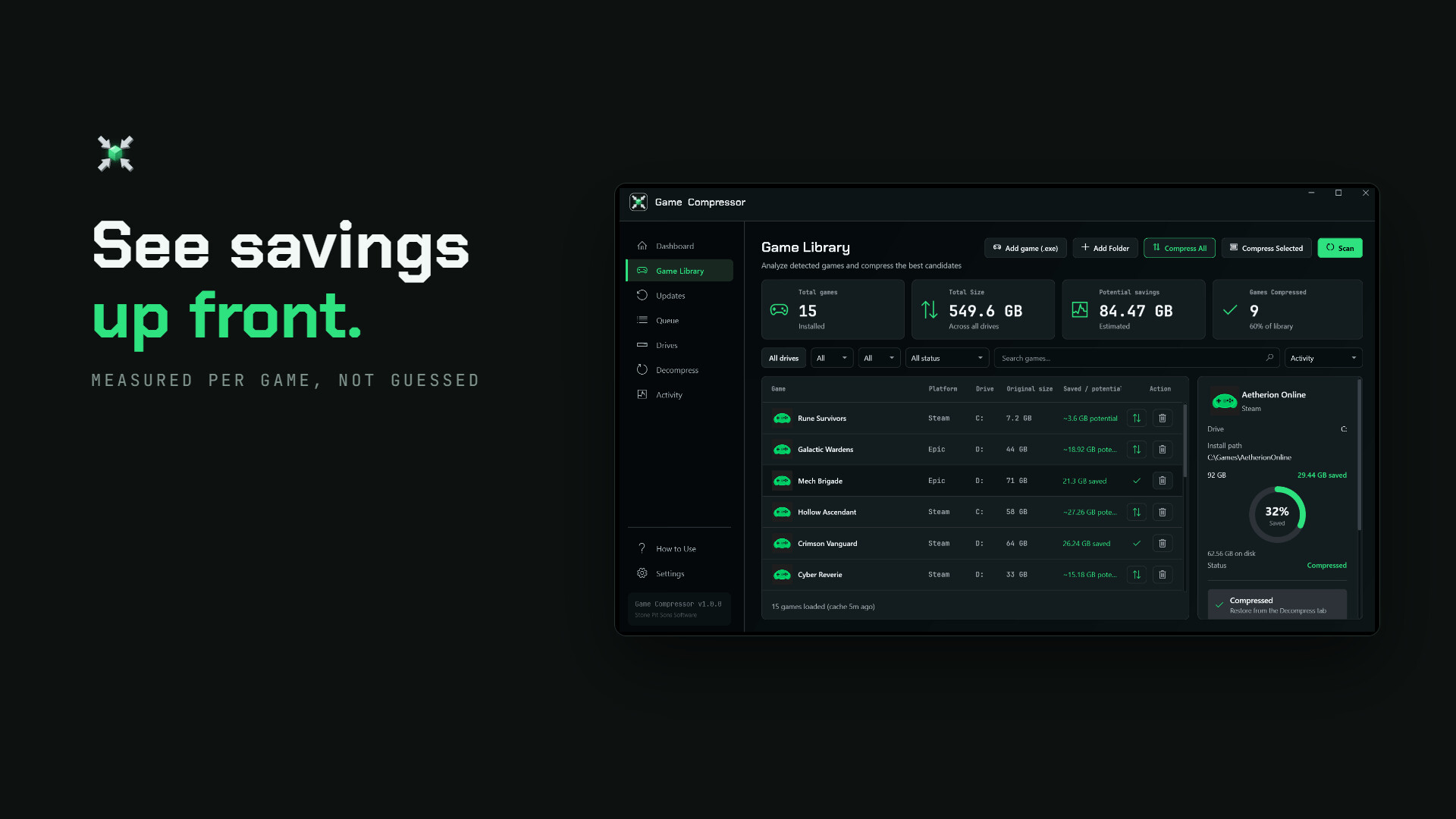
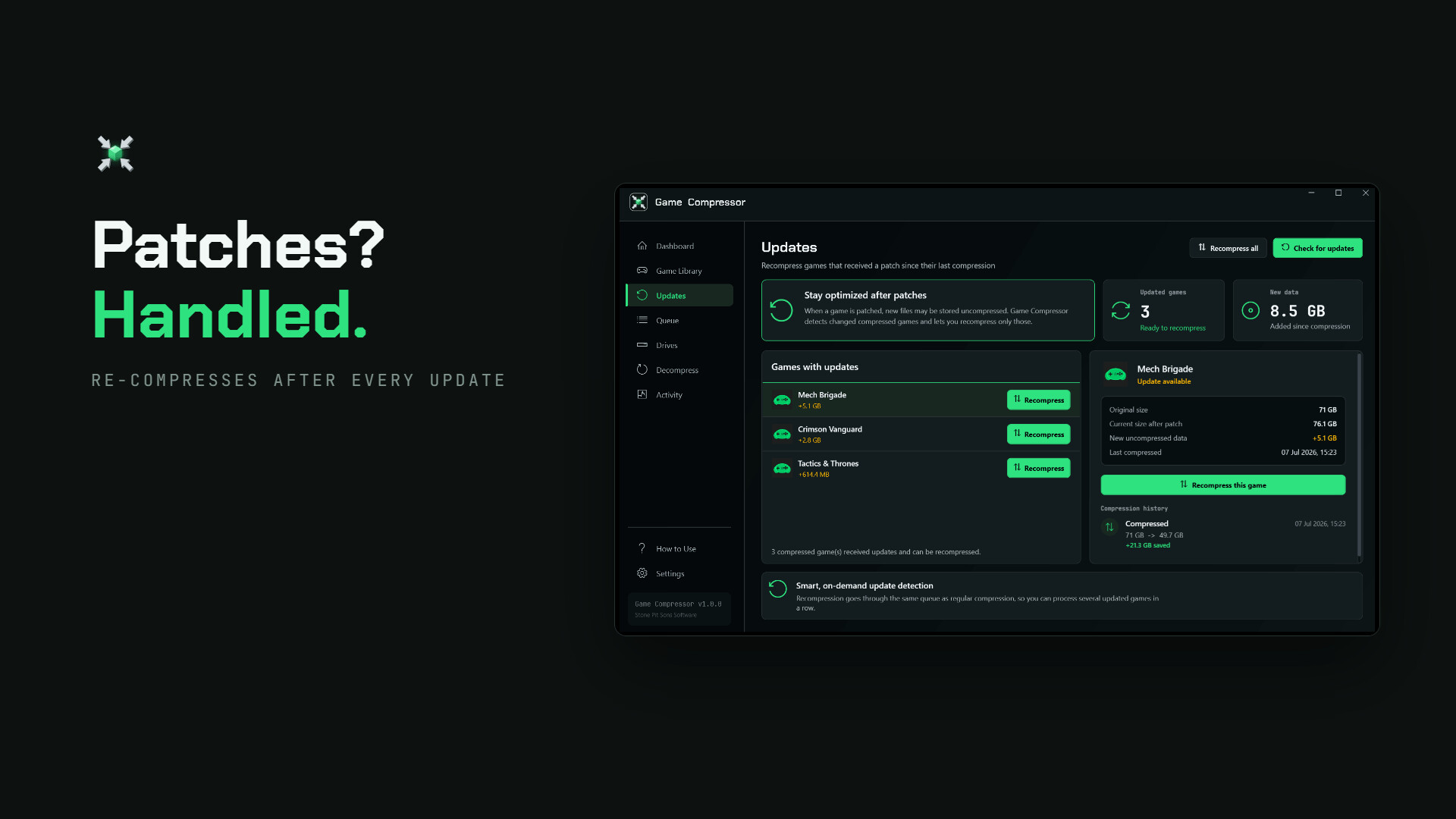
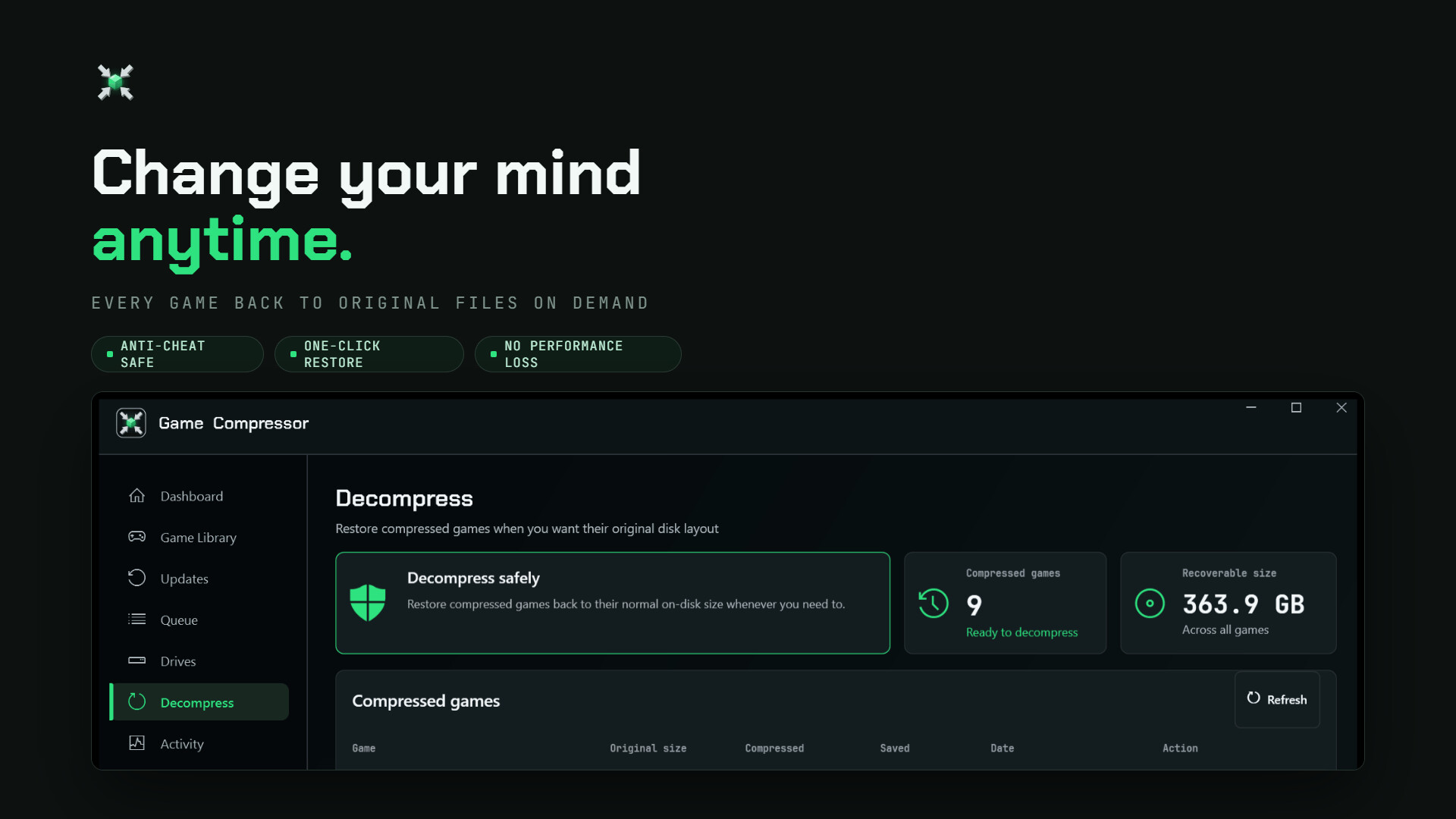
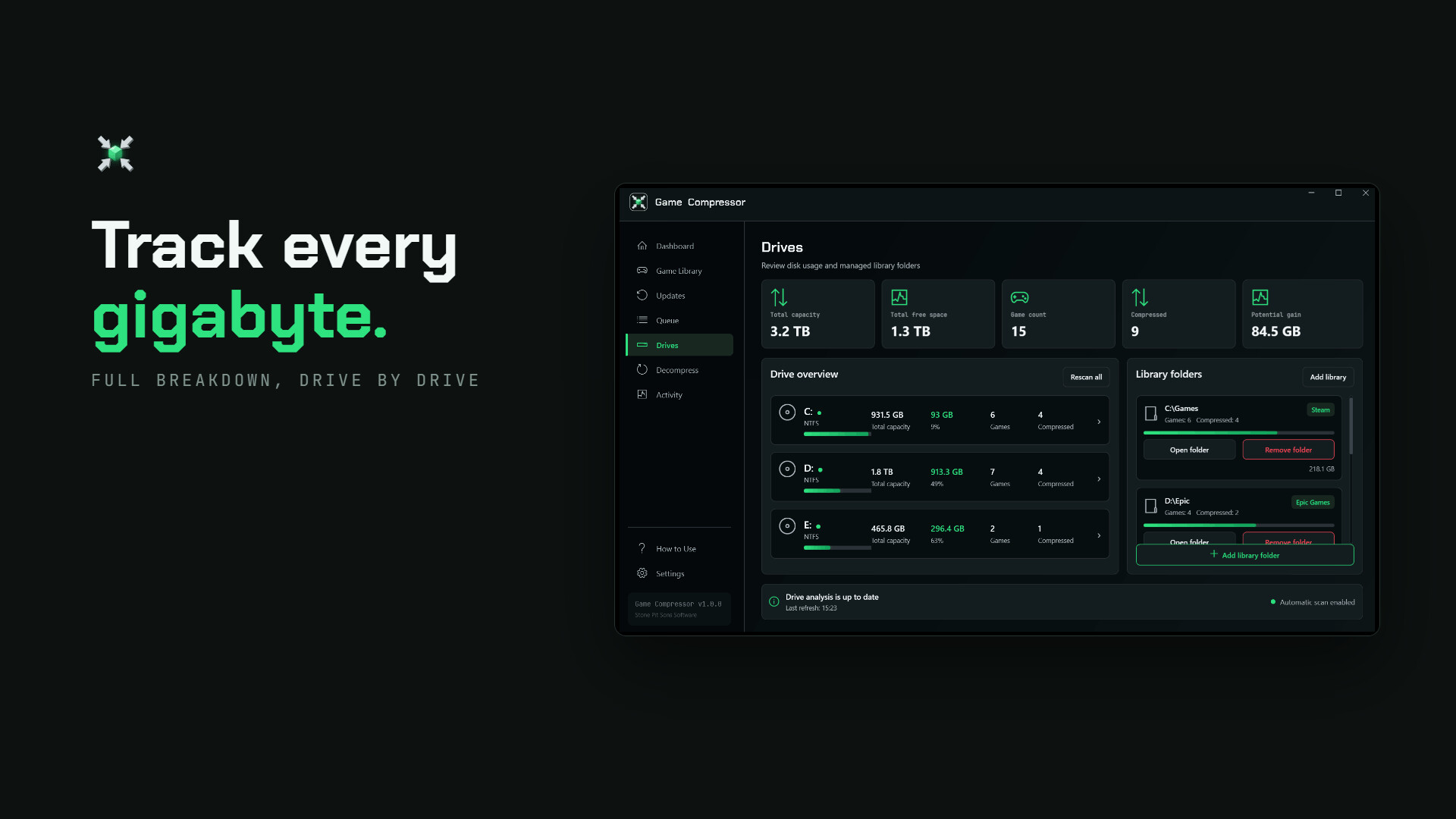
GAIN MORE SPACE WITHOUT DELETING GAMES Modern games keep getting larger, but your storage capacity does not grow at the same rate. Game Compressor optimizes your game files using Windows’ built-in LZX compression technology so they occupy less space on your disk. Thanks to the new smart estimation system, you can see approximately how much space you may save before starting to compress a game. This allows you to select only the games worth compressing without spending time on games that would provide minimal savings. VIEW ESTIMATED SAVINGS BEFORE COMPRESSION Not every game shrinks by the same amount. The file structure of some games can provide significant space savings, while others may already be heavily compressed by their developers. Game Compressor uses existing compression data to generate estimated space savings for games. After scanning your library, you can compare the current sizes, potential savings and compression statuses of your games on a single screen. View the potential savings before starting compression. Easily identify the games with the highest potential. Avoid wasting time on operations that would provide minimal savings. Add multiple games to the queue and compress them one after another. The displayed potential values are estimates. Actual results may vary depending on the game version, file structure and the game files present on your system. HOW DOES IT WORK? Game Compressor does not convert games into ZIP or RAR archives. It uses the transparent LZX compression infrastructure that operates at the Windows file system level. Reduced Disk Usage: Supported game files physically occupy less space on the disk. Transparent Access: Windows and your games continue to access the files normally. No Archive Extraction: You do not need to wait for files to be extracted again each time you launch the game. Once compression is complete, you can run your game normally. Reversible Operation: You can remove compression at any time and restore the game files to their normal disk usage. SIMPLE AND CONTROLLED OPERATION The new version of Game Compressor is designed to help you manage your storage space consciously. 1. Scan Your Library: Open the program and detect your installed games. 2. Review Potential Savings: See approximately how much space you may save from each game. 3. Select Your Games: Identify the games worth compressing and add them to the queue. 4. Compress and Keep Playing: Once the operation is complete, launch your games normally without waiting for archive extraction. 5. Check for Updates: Detect games that require reoptimization after receiving updates. 6. Reverse When Necessary: Remove compression from games that are causing problems or that you want to restore to their normal state. RECLAIM YOUR SPACE AFTER UPDATES Game updates may add new files or modify files that were previously compressed. As a result, a compressed game may begin using more space again over time. The Updates screen in Game Compressor lets you view games that have been modified since the last compression operation. You can reclaim the disk space you lost by compressing updated games again. The program does not need to remain open continuously. You can check your library again after game updates. You can focus only on games that require reoptimization. Rather than being a one-time operation, Game Compressor provides sustainable space management for your game library. MANAGE ALL OPERATIONS FROM ONE SCREEN Game Compressor brings together the information you need to control your games and storage space in clear, easy-to-understand screens. Overview: View the total space saved, potential savings and disk usage. Games: Compare game sizes, estimated savings and compression statuses. Queue: Queue multiple games and monitor ongoing operations. Updates: View games that have received updates and need to be compressed again. Decompress: Restore previously compressed games to their original state at any time. Drives and Libraries: Manage your game libraries and storage drives. Activity: Review scan, compression, reversal, warning and error records. REALISTIC AND TRANSPARENT RESULTS Game Compressor does not promise the same result for every game. The amount of space saved depends entirely on the game’s file structure. High-Potential Games: AAA and open-world games containing large audio, texture and data files that have not been heavily compressed by their developers may provide greater space savings. Previously Optimized Games: Games whose files are already highly compressed may provide lower savings. This is exactly why the new estimation system was developed: It helps you view a game’s potential before the operation begins and make your decision accordingly. SAFE AND REVERSIBLE COMPRESSION Game Compressor does not inject code into memory while a game is running and does not interfere with game processes. Operations are performed through the Windows file system. Does Not Modify Game Code: It does not alter running game processes or game memory. Uses Windows Technology: It operates with the LZX compression infrastructure integrated into Microsoft’s operating system. Completely Reversible: You can remove compression from any game through the Decompress screen. You Remain in Control: You decide which games are compressed or restored and when. WHO IS IT FOR? Low-Capacity SSD Users: Keep more games installed on desktop and laptop computers with limited storage space. Windows Handheld Players: Use the limited storage capacity of Windows-based devices such as ROG Ally and Legion Go more efficiently. Game Archivists: Instead of deleting games you rarely play, store them so they occupy less space. Players with Large Game Libraries: Manage multiple drives and game libraries from a single application. KEY FEATURES View estimated space savings before compression Transparent file compression based on Windows LZX Automatic game library scanning Compare games based on potential savings Compression queue for multiple games Detect games that have received updates Reoptimize updated games One-click reversible compression Disk, library and operation history management SYSTEM REQUIREMENTS Windows 10 Version 1507 or newer Windows 11 NTFS-formatted storage drive that supports LZX compression
Content & age ratings2 regional ratings

Regional ratings

DEJUSl
IGRS3
System requirementsMinimum and recommended hardware

Minimum

Minimum: Requires a 64-bit processor and operating system OS: Windows 10 (64-bit) Processor: Intel Core i3 or AMD equivalent Memory: 4 GB RAM Graphics: DirectX 11 compatible graphics card Storage: 500 MB available space

Recommended

Recommended: Requires a 64-bit processor and operating system OS: Windows 10 / 11 (64-bit) Processor: Intel Core i5 / Ryzen 5 or higher (More cores = Faster compression) Memory: 8 GB RAM Graphics: NVIDIA GeForce GTX 1050 or equivalent

macOS

Minimum: Recommended:

Linux

Minimum: Recommended:
Supported languages31 languages
LanguageFull audio
English
French
Italian
German
Spanish - Spain
Arabic
Simplified Chinese
Portuguese - Brazil
Bulgarian
Danish
Indonesian
Dutch
Finnish
Traditional Chinese
Japanese
Korean
Spanish - Latin America
Polish
Hungarian
Norwegian
Portuguese - Portugal
Romanian
Russian
Thai
Turkish
Ukrainian
Vietnamese
Greek
Czech
Swedish
Hindi

A blank audio cell means full audio was not marked in the returned language list.

Screenshots & trailersScreenshots and trailers

Trailers

AchievementsTotal count and selected achievements

10 developer announcements, Feb 2026 to Aug 2026 · times in UTC

August

  1. Game Compressor v1.1.1 Update and Apology

    I disappeared for a month. No update came out, and I didn't write a single reply on the forums. You noticed; a "Where's the Dev?" thread went up, and the person who opened it was right from start to finish.Here is what happened: after I…

    gamecompressor

July

  1. Game Compressor v1.0.0 Full Release

    Game Compressor v1.0.0 - Full ReleaseGame Compressor is officially out of Early Access! v1.0.0 is our biggest update yet: a brand-new look, compression that finishes media-heavy games in roughly half the time (same savings), 10 new…

    gamecompressor
  2. Game Compressor v0.9.9.4

    Game Compressor v0.9.9.4This update is about trust. You told us the app wouldn't close properly, that progress looked frozen, and that savings numbers didn't match what Windows showed. You were right - all three are fixed, and every number…

    gamecompressor

June

  1. Game Compressor v0.9.9.2.1 Hotfix

    The v0.9.9.2.1 hotfix is now available.This update focuses on the issues reported after the v0.9.9.2 release. Thanks to everyone who took the time to report them.Compression QueueStuck compression jobs are now detected automatically.Failed…

    Patch notes
  2. Game Compressor v0.9.9.2 — Hotfix

    🐛 Fixes• CRITICAL: Fixed high CPU and RAM usage while the application was idle, especially during the first launch after an update.• Fixed an issue where recompression tasks from the Updates tab could become stuck in the queue. Unresponsive…

    Patch notes
  3. Game Compressor v0.9.9.1 — Hotfix

    🐛 Fixes • CRITICAL: Fixed an issue where the queue could freeze or remain inactive while compressing certain games. A deadlock caused by locked game files has been fully resolved, and operations are now protected by a safe timeout…

    Patch notes
  4. Game Compressor v0.9.9 Is Out — See What You Could Save Before Compressing

    🎮 Game Compressor v0.9.9 — Major UpdateGame Compressor v0.9.9 is now available.This update is the most comprehensive version of Game Compressor to date. The application’s interface, game analysis system, compression queue, update…

    gamecompressor

May

  1. Update 0.9.1: Bug Fixes & More Platforms

    Hey guys! first of all, a massive thank you for all the feedback and bug reports over the last few days. ive been working non-stop to fix the most annoying issues u guys mentioned, and here is patch 0.9.1!here is what we got in this…

    Patch notes
  2. 📢 About the Game Compressor Update and Our New Projects

    Hello everyone,I would like to sincerely thank you for your interest in Game Compressor and for all your feedback. Every comment, whether positive or negative, is crucial for steering the project in the right direction.I am aware of the…

    gamecompressor

February

  1. Update v0.9: Premium UI, HD Icons & Light Theme! ✨

    Hello everyone! Thanks to your amazing feedback, we are thrilled to release Update v0.9. This patch completely overhauls the UI for a more premium feel, adds highly requested features, and fixes critical bugs. We are now one step closer to…

    gamecompressor

All games on this site