STEAMDB NEXUS

Steam app 1494460 · updated 12 Sep 2026, 19:15 UTC

Desktop+

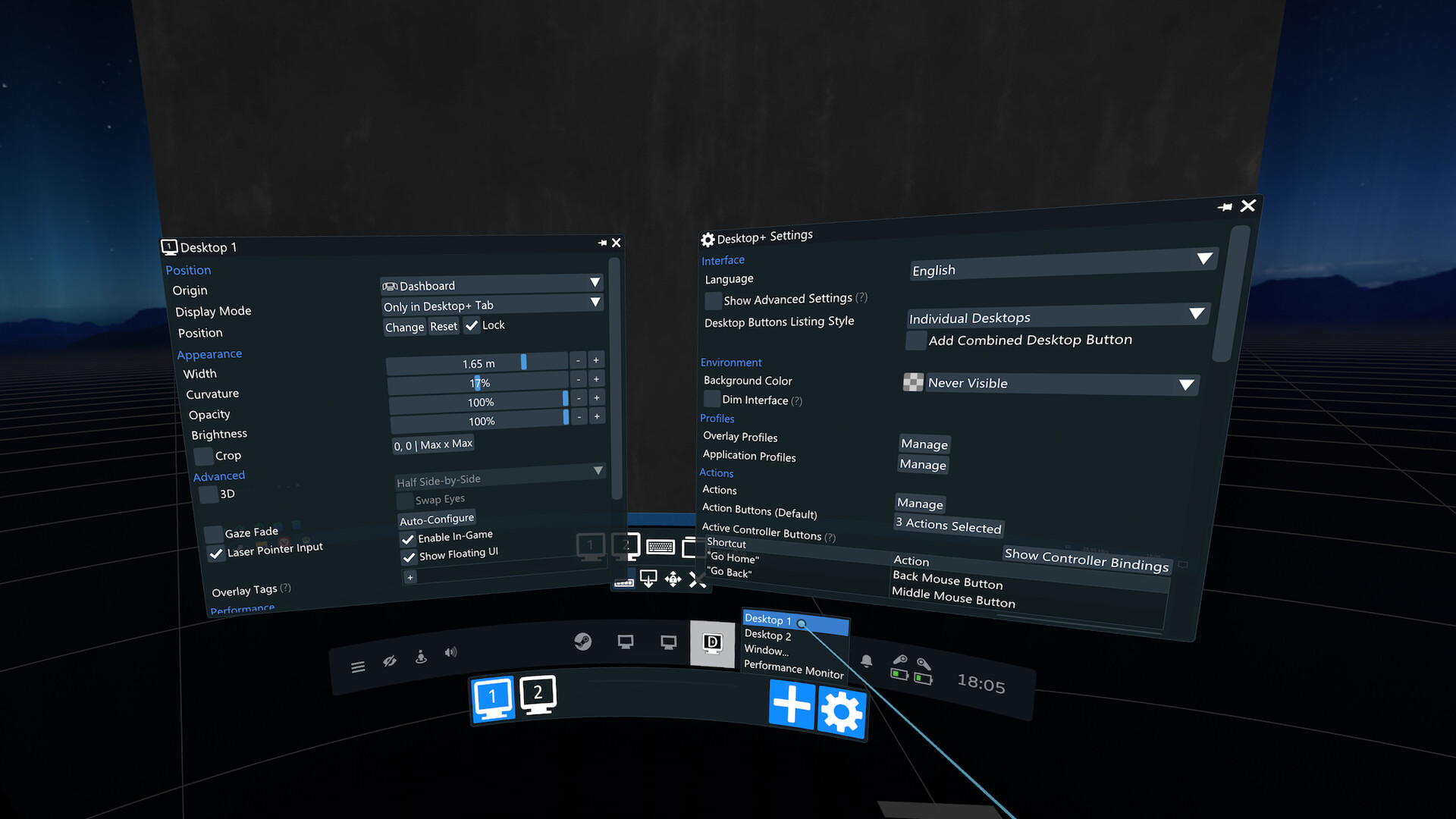
Desktop+ is a utility application for SteamVR enabling you advanced access to your desktops and windows from within VR. Pull your screen into the VR world, attach windows to your controllers, view 3D content, and more.

Desktop+ Steam header artwork
elvissteinjrelvissteinjr
130playing now
13224-hour peak
174all-time peak
105average, last 30 days

The last 30 days

−0.7Gain−0.69%% gain162Peak

719 hourly samples, with the daily peak drawn over them. Weekends are shaded.

0448713117513 Aug18 Aug23 Aug28 Aug02 Sep07 Sep12 SepThursday 13 August 2026106 peakFriday 14 August 2026130 peakSaturday 15 August 2026143 peakSunday 16 August 2026154 peakMonday 17 August 2026146 peakTuesday 18 August 2026133 peakWednesday 19 August 2026119 peakThursday 20 August 2026130 peakFriday 21 August 2026131 peakSaturday 22 August 2026147 peakSunday 23 August 2026162 peakMonday 24 August 2026133 peakTuesday 25 August 2026127 peakWednesday 26 August 2026115 peakThursday 27 August 2026120 peakFriday 28 August 2026122 peakSaturday 29 August 2026142 peakSunday 30 August 2026147 peakMonday 31 August 2026131 peakTuesday 01 September 2026125 peakWednesday 02 September 2026124 peakThursday 03 September 2026112 peakFriday 04 September 2026132 peakSaturday 05 September 2026162 peakSunday 06 September 2026145 peakMonday 07 September 2026135 peakTuesday 08 September 2026125 peakWednesday 09 September 2026113 peakThursday 10 September 2026113 peakFriday 11 September 2026125 peakSaturday 12 September 2026132 peak
Daily peakEvery hourly sample

All time

69 months, January 2021 to September 2026. The highest number of people in the game at once, each month, on a time axis -- a gap in the record stays a gap.

04794141188Jan 2021Dec 2021Nov 2022Oct 2023Sep 2024Aug 2025Jul 2026January 2021120 monthly peakFebruary 2021145 monthly peakMarch 2021136 monthly peakApril 2021133 monthly peakMay 2021127 monthly peakJune 2021110 monthly peakJuly 2021108 monthly peakAugust 2021122 monthly peakSeptember 2021115 monthly peakOctober 2021135 monthly peakNovember 2021137 monthly peakDecember 2021165 monthly peakJanuary 2022165 monthly peakFebruary 2022160 monthly peakMarch 2022149 monthly peakApril 2022158 monthly peakMay 2022149 monthly peakJune 2022141 monthly peakJuly 2022142 monthly peakAugust 2022133 monthly peakSeptember 2022155 monthly peakOctober 2022163 monthly peakNovember 2022136 monthly peakDecember 2022146 monthly peakJanuary 2023169 monthly peakFebruary 2023160 monthly peakMarch 2023152 monthly peakApril 2023142 monthly peakMay 2023133 monthly peakJune 2023120 monthly peakJuly 2023125 monthly peakAugust 2023129 monthly peakSeptember 2023120 monthly peakOctober 2023113 monthly peakNovember 2023127 monthly peakDecember 2023142 monthly peakJanuary 2024120 monthly peakFebruary 2024146 monthly peakMarch 2024139 monthly peakApril 2024139 monthly peakMay 2024128 monthly peakJune 2024117 monthly peakJuly 2024110 monthly peakAugust 2024137 monthly peakSeptember 2024102 monthly peakOctober 2024110 monthly peakNovember 2024100 monthly peakDecember 2024112 monthly peakJanuary 2025112 monthly peakFebruary 2025150 monthly peakMarch 202598 monthly peakApril 2025106 monthly peakMay 202597 monthly peakJune 2025105 monthly peakJuly 202594 monthly peakAugust 2025105 monthly peakSeptember 2025102 monthly peakOctober 2025107 monthly peakNovember 2025108 monthly peakDecember 2025126 monthly peakJanuary 2026136 monthly peakFebruary 2026125 monthly peakMarch 2026174 monthly peakApril 2026136 monthly peakMay 2026140 monthly peakJune 2026149 monthly peakJuly 2026154 monthly peakAugust 2026162 monthly peakSeptember 2026162 monthly peak
Monthly peak

The last four months

Show:

The highest number of people in the game at once, each month. Four, because four is as far back as the source keeps anything finer than one figure a month.

04487131175July 2026August 2026September 2026October 2026July 2026154 peak — daily detail belowAugust 2026162 peak — hourly detail belowSeptember 2026162 peak — hourly detail below
Monthly peakHas finer data

July 2026

31 days, each one the highest figure that day. The source keeps no hourly detail this far back. Weekends are shaded.

0428312516601 Jul06 Jul11 Jul16 Jul21 Jul26 Jul31 JulWednesday 01 July 2026112 peakThursday 02 July 2026120 peakFriday 03 July 2026124 peakSaturday 04 July 2026132 peakSunday 05 July 2026125 peakMonday 06 July 2026128 peakTuesday 07 July 2026121 peakWednesday 08 July 2026121 peakThursday 09 July 2026128 peakFriday 10 July 2026127 peakSaturday 11 July 2026131 peakSunday 12 July 2026154 peakMonday 13 July 2026114 peakTuesday 14 July 2026114 peakWednesday 15 July 2026115 peakThursday 16 July 2026109 peakFriday 17 July 2026118 peakSaturday 18 July 2026135 peakSunday 19 July 2026126 peakMonday 20 July 2026126 peakTuesday 21 July 2026116 peakWednesday 22 July 2026114 peakThursday 23 July 2026114 peakFriday 24 July 2026136 peakSaturday 25 July 2026131 peakSunday 26 July 2026140 peakMonday 27 July 2026135 peakTuesday 28 July 2026110 peakWednesday 29 July 2026148 peakThursday 30 July 2026146 peakFriday 31 July 2026124 peak

August 2026

31 days as the curve, each the highest figure that day. Behind it, 437 hourly samples from 13 Aug, which is as far back as the source keeps every hour. Weekends are shaded.

0448713117501 Aug06 Aug11 Aug16 Aug21 Aug26 Aug31 AugSaturday 01 August 2026141 peakSunday 02 August 2026152 peakMonday 03 August 2026123 peakTuesday 04 August 2026131 peakWednesday 05 August 2026123 peakThursday 06 August 2026119 peakFriday 07 August 2026121 peakSaturday 08 August 2026142 peakSunday 09 August 2026136 peakMonday 10 August 2026142 peakTuesday 11 August 2026121 peakWednesday 12 August 2026116 peakThursday 13 August 2026138 peakFriday 14 August 2026130 peakSaturday 15 August 2026143 peakSunday 16 August 2026154 peakMonday 17 August 2026146 peakTuesday 18 August 2026133 peakWednesday 19 August 2026119 peakThursday 20 August 2026130 peakFriday 21 August 2026131 peakSaturday 22 August 2026147 peakSunday 23 August 2026162 peakMonday 24 August 2026133 peakTuesday 25 August 2026127 peakWednesday 26 August 2026115 peakThursday 27 August 2026120 peakFriday 28 August 2026122 peakSaturday 29 August 2026142 peakSunday 30 August 2026147 peakMonday 31 August 2026131 peak

September 2026

12 days as the curve, each the highest figure that day. Behind it, 282 hourly samples. Each dip is a night. Weekends are shaded.

0448713117501 Sep03 Sep05 Sep07 Sep09 Sep11 SepTuesday 01 September 2026125 peakWednesday 02 September 2026124 peakThursday 03 September 2026112 peakFriday 04 September 2026132 peakSaturday 05 September 2026162 peakSunday 06 September 2026145 peakMonday 07 September 2026135 peakTuesday 08 September 2026125 peakWednesday 09 September 2026113 peakThursday 10 September 2026113 peakFriday 11 September 2026125 peakSaturday 12 September 2026132 peak

October 2026

Desktop+ was released on 1 Jan, 2021.

Not out yet.There is nothing to draw for this month.
Nothing here is interpolated or estimated; where a sample is missing the line is broken.

Game information

Free to playUpdated 12 Sep 2026, 19:15 UTC
App ID
1494460
Last updated
14 Aug 2026 build 24743079
Developer
elvissteinjr
Publisher
elvissteinjr
Release date
1 Jan, 2021
Platforms
Windows
Download size
2 MB
Install size
5 MB
Genres
Utilities
Game modes
Controller support
Unknown

Features & support

Steam features

VR OnlySteam Cloud

Controllers & input

Tracked Controller Support

Accessibility

Popular tags

UtilitiesVRSoftwareFree to PlayIndie
About this gameFull description from Steam
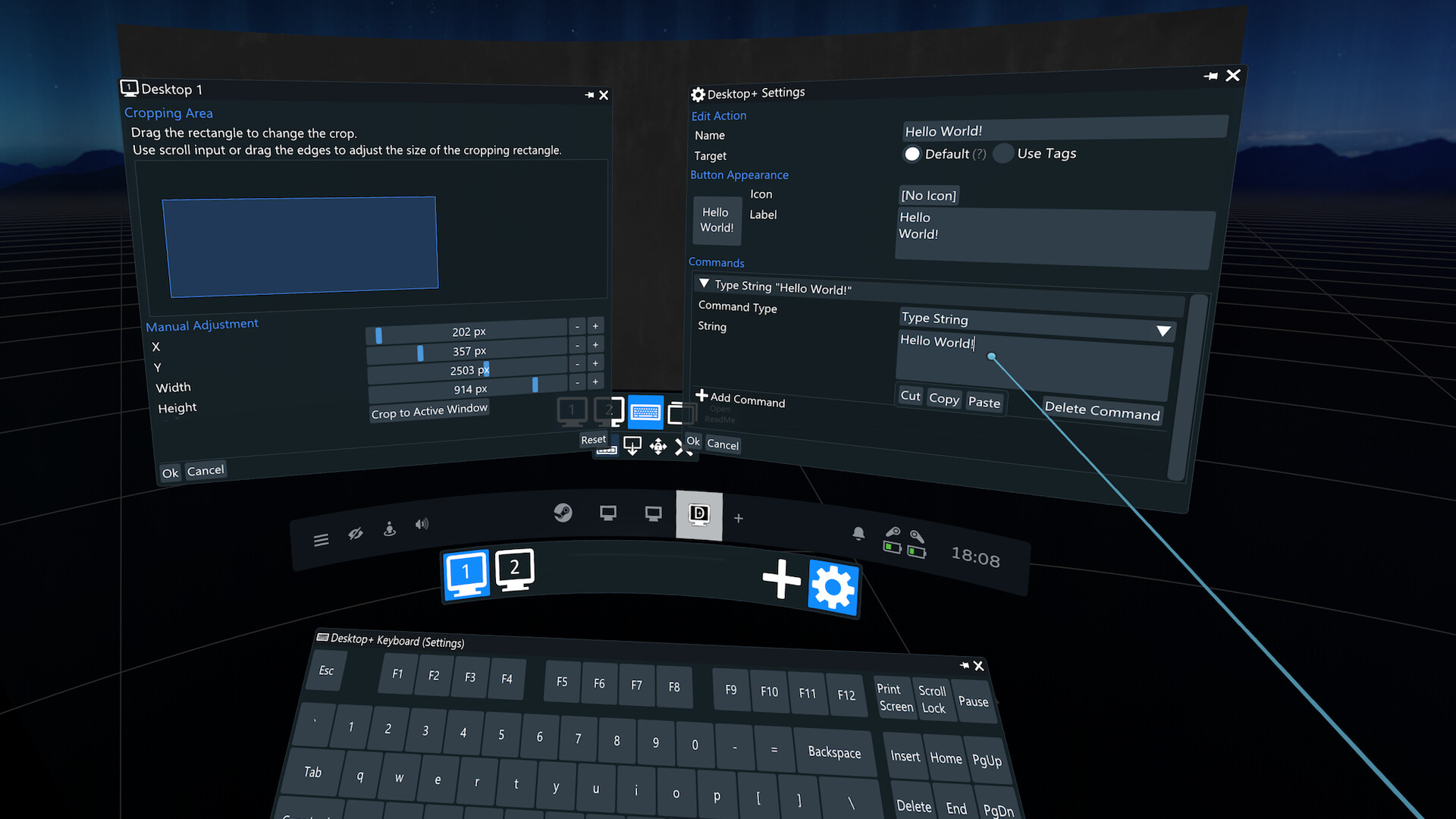
Desktop+ is a powerful, yet lightweight tool for SteamVR bringing your desktops and windows into the VR world. No matter if you just need a more reliable desktop view in your dashboard or a complex context-aware multi-overlay setup with custom shortcuts, Desktop+ offers a wide array of tweakable settings to make the overlays fit your needs. Features User interface with real-time adjustments accessible in VR or on desktop Smooth, low-latency mirroring of desktops and windows Low memory footprint and performance impact Support for creating as many overlays as SteamVR allows at once Customizable overlay settings (width, position, curvature, opacity, brightness, cropping), with switchable profiles 3D support (SBS, HSBS, OU, HOU) Overlay visibility and origin settings: Display a desktop/window during gameplay or attach it to a different origin (play space, seated position, dashboard, HMD, controllers, tracker, SteamVR Theater Screen) Actions: User-definable functions (input simulation, running applications, overlay control) which can be bound to controller or UI buttons Custom laser pointer implementation, allowing for non-blocking overlay interaction during gameplay Configurable PC-style VR keyboard with various layouts and a keyboard layout editor for deeper customization, appearing automatically when detecting text input widget focus Elevated access toggle, making it possible to deal with UAC prompts and other UIP-restricted UI in VR without using full admin-access at all times Gaze Fade: Fade-out overlay when not looking at it Window management: Change window focus depending on overlay/dashboard state or drag overlays when dragging the title bar of a mirrored window Performance Monitor: View system performance in real-time Application profiles: Automatically switch overlay profiles when a specific VR application is being run
Content & age ratings2 regional ratings

Regional ratings

DEJUSl
IGRS3
System requirementsMinimum and recommended hardware

Minimum

Minimum: Requires a 64-bit processor and operating system OS *: Windows 8.1 or newer Processor: Intel Core i5-4590/AMD FX 8350 equivalent or better Memory: 4 GB RAM Graphics: NVIDIA GeForce GTX 970, AMD Radeon R9 290 equivalent or better DirectX: Version 10 Storage: 5 MB available space VR Support: SteamVR Additional Notes: Window capture requires Windows 10 version 1803 or newer

Recommended

Recommended: Requires a 64-bit processor and operating system OS: Windows 10 version 2004 or newer

macOS

Minimum: Recommended:

Linux

Minimum: Recommended:
Supported languages3 languages
LanguageFull audio
English
German
Japanese

A blank audio cell means full audio was not marked in the returned language list.

Screenshots & trailersScreenshots and trailers

Trailers

AchievementsTotal count and selected achievements

50 developer announcements, Mar 2022 to Aug 2026 · times in UTC

August

  1. Desktop+ v.3.6

    What's new in Desktop+ 3.6? Desktop+ 3.6 reduces GPU memory usage while idle, adds eye tracking support for Gaze Fade, and features adjustments for the current SteamVR beta build alongside other minor fixes. Reduced GPU memory usage…

    elvissteinjr

July

  1. Desktop+ v.3.5.2 Beta

    This is an update for the beta branch of Desktop+. New: Added eye tracking support for Gaze Fade Eye tracking has to be bound and valid in the HMD's Desktop+ input bindings for the option to show up. This shouldn't be an issue unless you've…

    Patch notes

June

  1. Desktop+ v.3.5.1 Beta

    This is an update for the beta branch of Desktop+. New: Reduced GPU memory usage during idle Changed: Updated Steam Frame Controller bindings to match official VR Dashboard ones Fixed: Fixed GPU memory leak on Desktop Duplication reset…

    Patch notes
  2. Desktop+ v.3.5

    What's new in Desktop+ 3.5? Desktop+ 3.5 mainly comes with a series of fixes to keep up with ongoing changes from SteamVR updates, but there are also some other minor improvements and very appreciated community contributions. Theater Screen…

    elvissteinjr

May

  1. Desktop+ v.3.4.2 Beta

    This is an update for the beta branch of Desktop+. Fixed: Fixed Desktop+ Laser Pointer visuals not applying custom SteamVR controller offsets This requires Desktop+ to manually position the laser very frame, which may lag behind the actual…

    Patch notes

April

  1. Desktop+ v.3.4.1 Beta

    This is an update for the beta branch of Desktop+. New: Added default bindings for Steam Link Hand Tracking These bindings are very limited, but mirror the default VR Dashboard ones in this regard. Main motivation for these is to get proper…

    Patch notes

February

  1. Desktop+ v.3.4

    What's new in Desktop+ 3.4? Desktop+ 3.4 features a new Performance Monitor style, overlay origin smoothing, new community keyboard layouts and various other fixes and improvements. Performance Monitor Enhancements The Performance Monitor…

    elvissteinjr
  2. Desktop+ v.3.3.4 Beta

    This is an update for the beta branch of Desktop+. New: Added Origin Smoothing overlay property Origin Smoothing is available for the HMD and HMD Floor origins. This smoothing uses the same underlying algorithm as the mouse input smoothing…

    Patch notes

January

  1. Desktop+ v.3.3.3 Beta

    This is an update for the beta branch of Desktop+. New: Added QWERTY (Thai Kedmanee) community keyboard layout by TangMo Similar to other recent additions, this layout is designed to be used on a Thai system and expects the Windows keyboard…

    Patch notes
  2. Desktop+ v.3.3.2 Beta

    This is an update for the beta branch of Desktop+. New: Added Performance Monitor "Minimal" style Sometimes less is less and just what you want. This style allows for a one-line set of performance metrics and might be preferred when…

    Patch notes

December

  1. Desktop+ v.3.3.1 Beta

    This is an update for the beta branch of Desktop+. New: Added "Alternative Cursor Rendering" Desktop Duplication setting This setting is meant to help some users experiencing issues with the hardware cursor capture using Desktop…

    Patch notes

November

  1. Desktop+ v.3.3

    What's new in Desktop+ 3.3? Desktop+ 3.3 features better keyboard labels, new community contributions, and fixes for compatibility with the new stable SteamVR version. Community Additions This version of Desktop+ comes with more…

    elvissteinjr
  2. Desktop+ v.3.2.2 Beta

    This is an update for the beta branch of Desktop+. New: Added QWERTZ (Hungary) community keyboard layout by Lenr Added support for keyboard key label line-alignment Labels default to center alignment. Left or right alignment can be set by…

    Patch notes

September

  1. Desktop+ v.3.2.1 Beta

    This is an update for the beta branch of Desktop+. New: Added Korean community translation by HisaCat Added Korean 2-set community keyboard layout by HisaCat Fixed: Fixed dashboard origin being offset in SteamVR 2.13.1 and newer Fixed…

    Patch notes

August

  1. Desktop+ at gamescom 2025

    Once again it's time for this thing. It's another year for me to be present at gamescom as an exhibitor with my good friends of the DragonBox Shop (from August 20st to the 24th). We're in the retro area in hall 10.2. While the booth is…

    elvissteinjr

June

  1. Desktop+ v.3.2

    What's new in Desktop+ 3.2? Desktop+ 3.2 features new community contributions, an updated CEF version for Desktop+ Browser and rotation snapping drag setting. Desktop+ Browser Updated to CEF 127 The Chromium Embedded Framework used by…

    elvissteinjr

April

  1. Desktop+ v.3.1.1 Beta

    This is an update for the beta branch of Desktop+. New: Desktop+ Browser Updated to CEF 127 The Chromium Embedded Framework used by Desktop+ Browser has been updated to version 127. This is equivalent with Chromium 127. Though the real…

    Patch notes

March

  1. Desktop+ v.3.1

    What's new in Desktop+ 3.1? Desktop+ 3.1 features (still experimental) HDR mirroring support, performance improvements and additional input options. It also adapts to recent SteamVR changes. HDR mirroring support HDR mirroring works for…

    elvissteinjr

February

  1. Desktop+ v.3.0.4 Beta

    This is an update for the beta branch of Desktop+. New: UI Performance Optimizations This version adds various optimizations to the rendering logic of the interface parts of Desktop+. In particular, this includes partial overlay texture…

    Patch notes

January

  1. Desktop+ v.3.0.3 Beta

    This is an update for the beta branch of Desktop+. New: Added "Drag Overlay" Desktop+ laser pointer input action This input action is an alternative way of dragging overlays regardless of the drag-mode state. Note that it is not bound by…

    Patch notes

November

  1. Desktop+ v.3.0.2 Beta

    This is an update for the beta branch of Desktop+. New: Added experimental HDR mirroring support HDR mirroring works for both Desktop Duplication (default for desktop overlays) and Graphics Capture (desktop & window overlays) methods. The…

    Patch notes
  2. Desktop+ v.3.0.1

    This is a maintenance update fixing some minor issues that occurred with the 3.0 update, as well as adapting to recent SteamVR changes. New: Improved responsiveness of Desktop+ Laser Pointer mouse movement input, especially for the…

    Patch notes

October

  1. Desktop+ 3.0 is here!

    What's new in Desktop+ 3.0? In short: All-new interface, new and enhanced features, vast improvements on ease of use. The long version: {STEAM_CLAN_IMAGE}/39315717/20dd59c6681a52bf8439db20d5e7c1927e421b0d.png Floating Settings Windows…

    elvissteinjr

July

  1. Desktop+ NewUI Preview 15 now available

    The fifteenth and final preview build of the new in-development Desktop+ version is now available. Major release soon™. These builds are supposed to give a glimpse into the ongoing development process. The NewUI branch should be fine for…

    elvissteinjr

March

  1. Desktop+ NewUI Preview 14 now available

    The fourteenth preview build of the new in-development Desktop+ version is now available. Quick turnarounds*. These builds are supposed to give a glimpse into the ongoing development process. The NewUI branch should be fine for daily use if…

    elvissteinjr

January

  1. Desktop+ NewUI Preview 13.1

    This is a hotfix update for the NewUI Preview branches, addressing SteamVR Beta 2.3.1 compatibility. Fixed: Fixed Desktop+ Laser Pointer not working with SteamVR 2.3.1 and newer Other additions and changes are still work in progress and…

    Patch notes
  2. Desktop+ v.2.8.6

    This is a maintenance update for the stable branch of Desktop+. Fixed: Fixed keyboard not appearing when shown for an overlay outside of the dashboard Fixed keyboard extension position not accounting for the new drag handle of the legacy…

    Patch notes

December

  1. Desktop+ v.2.8.5

    This is a maintenance update for the stable branch of Desktop+. Fixed: Fixed overlay drags being interrupted by the system laser pointer hitting other overlays This was caused by a regression in SteamVR 2, but has been worked around for the…

    Patch notes
  2. Desktop+ NewUI Preview 13 now available

    The thirteenth preview build of the new in-development Desktop+ version is now available. These builds are supposed to give a glimpse into the ongoing development process. The NewUI branch should be fine for daily use if you can live with…

    elvissteinjr

October

  1. Desktop+ v.2.8.4

    This is a maintenance update for the stable branch of Desktop+. Added: Added optional offset for the dashboard overlay origin when the SteamVR 2 dashboard is active I did previously write there wouldn't be a fix for the shifted overlays...…

    Patch notes
  2. Desktop+ v.2.8.3

    This is a hotfix update for the stable branch of Desktop+, mainly addressing SteamVR 2 keyboard compatibility. Added: Added adjusted keyboard extension style for SteamVR 2 keyboard Added workarounds for SteamVR hiding the keyboard when…

    Patch notes

September

  1. Desktop+ NewUI Preview 12.1 & Desktop+ v.2.8.2

    This is a hotfix update for the NewUI Preview and stable branch of Desktop+, mainly addressing SteamVR 2 compatibility. Desktop+ v.2.8.2: Added: Added adjusted dashboard icon for SteamVR 2 dashboard Fixed: Fixed crash during window matching…

    Patch notes

August

  1. Desktop+ NewUI Preview 12 now available

    The twelfth preview build of the new in-development Desktop+ version is now available. Not dead yet. These builds are supposed to give a glimpse into the ongoing development process. The NewUI branch should be fine for daily use if you can…

    elvissteinjr

June

  1. Desktop+ NewUI Preview 11.2

    This is a hotfix update for the NewUI Preview branch of Desktop+. Fixed: Fixed Desktop Duplication intersection mask not accounting for negative desktop coordinates Fixed "Failed to get duplicate output" error with certain multi-GPU…

    Patch notes
  2. Desktop+ v.2.8.1

    This is a maintenance update fixing issues with certain multi-GPU configurations introduced in the last build. Fixed: Fixed "Failed to get duplicate output" error with certain multi-GPU configurations Fixed Desktop Duplication capture…

    Patch notes

May

  1. Desktop+ v.2.8

    This update has been rolled back for the time being as it has issues preventing Desktop+ from working entirely on some systems. The beta branch still has this build if you had no issues and want to use it. What's new in Desktop+ 2.8?…

    Patch notes
  2. Desktop+ NewUI Preview 11.1

    This is a hotfix update for the NewUI Preview branch of Desktop+. Fixed: Fixed Desktop Duplication capture method not working when there are desktops with negative coordinates

    Patch notes

April

  1. Desktop+ v.2.7.1 Beta

    This is an update for the beta branch of Desktop+. New: Desktop Duplication overlay laser pointer input is now masked to the desktop layout (unused space is pass-through) Gaze Fade: Always use maximum opacity when the overlay is being…

    Patch notes
  2. Desktop+ NewUI Preview 11 now available

    The eleventh preview build of the new in-development Desktop+ version is now available. Still alive. These builds are supposed to give a glimpse into the ongoing development process. The NewUI branch should be fine for daily use if you can…

    elvissteinjr

February

  1. Desktop+ NewUI Preview 10.1

    This is a hotfix update for the NewUI Preview branch of Desktop+. Fixed: Fixed overlay positions not saving correctly after only switching origins without other changes Fixed empty Action Bar resulting in a small square window Fixed…

    Patch notes
  2. Desktop+ NewUI Preview 10 now available

    The tenth preview build of the new in-development Desktop+ version is now available. These builds are supposed to give a glimpse into the ongoing development process. The NewUI branch should be fine for daily use if you can live with the…

    elvissteinjr

December

  1. Desktop+ NewUI Preview 9 now available

    The ninth preview build of the new in-development Desktop+ version is now available. These builds are supposed to give a glimpse into the ongoing development process. The NewUI branch should be fine for daily use if you can live with the…

    elvissteinjr

October

  1. Desktop+ NewUI Preview 8 now available

    The eighth preview build of the new in-development Desktop+ version is now available. These builds are supposed to give a glimpse into the ongoing development process. The NewUI branch should be fine for daily use if you can live with the…

    elvissteinjr

September

  1. Desktop+ v.2.7

    What's new in Desktop+ 2.7? Version 2.7 mainly features smaller additions and fixes that were introduced in the beta branch since the last stable update. After over 9 months in development... it's more than time to bring the beta changes to…

    elvissteinjr

August

  1. Desktop+ at gamescom 2022

    Sadly no Desktop+ booth (what would that even look like?), but I'm technically an exhibitor. I'll be volunteering at the booth of my good friends of the DragonBox Shop. You can find us in hall 10.2 in the retro area, from the 24th to the…

    elvissteinjr

July

  1. Desktop+ is participating in the Steam VR Fest

    ...or is it? Desktop+ was invited to participate, so I just went ahead and opted in. The ongoing open nature of development and permanent free price tag makes it a less than ideal target for the promotion via discount or demo (I didn't hold…

    elvissteinjr
  2. Desktop+ NewUI Preview 7 now available

    The seventh preview build of the new in-development Desktop+ version is now available. These builds are supposed to give a glimpse into the ongoing development process. The NewUI branch should be fine for daily use if you can live with the…

    elvissteinjr

May

  1. Introducing Browser Overlays

    As previously announced, Desktop+ now comes with web browsing functionality in the form of a new overlay type: The Browser Overlay. Since not everyone needs a fully-fledged browser in their desktop viewing app and a copy a Chromium is…

    elvissteinjr

March

  1. April Status Update

    Future versions of Desktop+ will come with a copy of Chromium bundled in to allow a more immersive experience. The install size of the app will then be roughly 53x of the current one. RAM upgrade is recommended in preparation of these…

    elvissteinjr
  2. Desktop+ v.2.6.3 Beta

    This is an update for the beta branch of Desktop+. New: Added Brightness slider in the overlay appearance settings Changed: Improved responsiveness after display changes (resolution switches, desktop arrangements, display connects) Minor…

    Patch notes

All games on this site