STEAMDB NEXUS

Steam app 4214760 · updated 12 Sep 2026, 22:39 UTC

HeadTrack

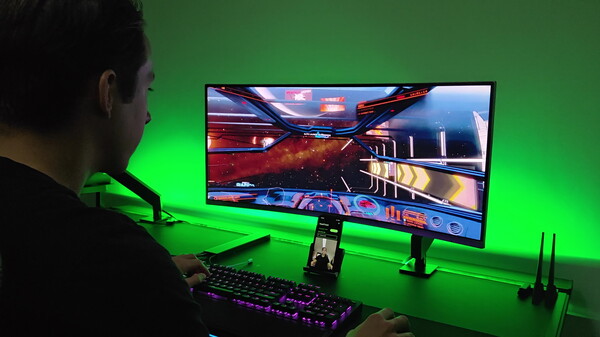
Use your phone as a head tracking device for games on your PC.

HeadTrack Steam header artwork
SmartFusionLabsSmartFusionLabs
6playing now
924-hour peak
11all-time peak
3average, last 30 days

The last 30 days

+0.7Gain+24.83%% gain11Peak

181 hourly samples, with the daily peak drawn over them. Weekends are shaded.

03691215 Aug21 Aug25 Aug29 Aug02 Sep06 Sep10 SepSaturday 15 August 20266 peakSunday 16 August 20267 peakTuesday 18 August 20264 peakWednesday 19 August 20265 peakFriday 21 August 20265 peakSaturday 22 August 20265 peakSunday 23 August 20268 peakMonday 24 August 20267 peakTuesday 25 August 20265 peakWednesday 26 August 20264 peakThursday 27 August 20261 peakFriday 28 August 20265 peakSaturday 29 August 20264 peakSunday 30 August 20261 peakMonday 31 August 20267 peakTuesday 01 September 20266 peakWednesday 02 September 20267 peakThursday 03 September 20267 peakFriday 04 September 20264 peakSaturday 05 September 202611 peakSunday 06 September 20267 peakMonday 07 September 20268 peakTuesday 08 September 20268 peakWednesday 09 September 20267 peakThursday 10 September 202610 peakFriday 11 September 20267 peakSaturday 12 September 20269 peak
Daily peakEvery hourly sample

All time

8 months, February 2026 to September 2026. The highest number of people in the game at once, each month, on a time axis -- a gap in the record stays a gap.

036912Feb 2026Mar 2026Apr 2026May 2026Jun 2026Jul 2026Aug 2026Sep 2026February 20263 monthly peakMarch 20264 monthly peakApril 20264 monthly peakMay 20266 monthly peakJune 20267 monthly peakJuly 20267 monthly peakAugust 20268 monthly peakSeptember 202611 monthly peak
Monthly peak

The last four months

Show:

The highest number of people in the game at once, each month. Four, because four is as far back as the source keeps anything finer than one figure a month.

036912July 2026August 2026September 2026October 2026July 20267 peak — daily detail belowAugust 20268 peak — hourly detail belowSeptember 202611 peak — daily detail below
Monthly peakHas finer data

July 2026

25 days, each one the highest figure that day. The source keeps no hourly detail this far back. Weekends are shaded.

0246801 Jul06 Jul10 Jul15 Jul21 Jul27 Jul31 JulWednesday 01 July 20267 peakFriday 03 July 20265 peakSaturday 04 July 20264 peakSunday 05 July 20263 peakMonday 06 July 20263 peakTuesday 07 July 20261 peakWednesday 08 July 20264 peakThursday 09 July 20261 peakFriday 10 July 20263 peakSaturday 11 July 20266 peakSunday 12 July 20261 peakTuesday 14 July 20263 peakWednesday 15 July 20266 peakThursday 16 July 20262 peakSunday 19 July 20266 peakMonday 20 July 20262 peakTuesday 21 July 20261 peakFriday 24 July 20263 peakSaturday 25 July 20265 peakSunday 26 July 20265 peakMonday 27 July 20265 peakTuesday 28 July 20264 peakWednesday 29 July 20262 peakThursday 30 July 20261 peakFriday 31 July 20262 peak

August 2026

24 days as the curve, each the highest figure that day. Behind it, 92 hourly samples from 15 Aug, which is as far back as the source keeps every hour. Weekends are shaded.

0246901 Aug05 Aug13 Aug19 Aug24 Aug28 AugSaturday 01 August 20264 peakSunday 02 August 20261 peakMonday 03 August 20263 peakTuesday 04 August 20263 peakWednesday 05 August 20266 peakThursday 06 August 20262 peakFriday 07 August 20262 peakWednesday 12 August 20265 peakThursday 13 August 20265 peakSaturday 15 August 20266 peakSunday 16 August 20267 peakTuesday 18 August 20264 peakWednesday 19 August 20265 peakFriday 21 August 20265 peakSaturday 22 August 20265 peakSunday 23 August 20268 peakMonday 24 August 20267 peakTuesday 25 August 20265 peakWednesday 26 August 20264 peakThursday 27 August 20261 peakFriday 28 August 20265 peakSaturday 29 August 20264 peakSunday 30 August 20261 peakMonday 31 August 20267 peak

September 2026

12 days, each one the highest figure that day. The source keeps no hourly detail this far back. Weekends are shaded.

03691201 Sep03 Sep05 Sep07 Sep09 Sep11 SepTuesday 01 September 20266 peakWednesday 02 September 20267 peakThursday 03 September 20267 peakFriday 04 September 20264 peakSaturday 05 September 202611 peakSunday 06 September 20267 peakMonday 07 September 20268 peakTuesday 08 September 20268 peakWednesday 09 September 20267 peakThursday 10 September 202610 peakFriday 11 September 20267 peakSaturday 12 September 20269 peak

October 2026

HeadTrack was released on 11 Feb, 2026.

Not out yet.There is nothing to draw for this month.
Nothing here is interpolated or estimated; where a sample is missing the line is broken.

Game information

Updated 12 Sep 2026, 22:39 UTC
App ID
4214760
Last updated
19 Aug 2026 build 24823804
Developer
SmartFusionLabs
Publisher
SmartFusionLabs
Release date
11 Feb, 2026
Platforms
WindowsmacOSLinux
Download size
90 MB47 MB100 MB
Install size
278 MB141 MB306 MB
Genres
Utilities
Game modes
Controller support
Unknown

Features & support

Steam features

Controllers & input

Accessibility

Popular tags

UtilitiesSoftwareSimulationRealisticControllerTrackIR
About this gameFull description from Steam
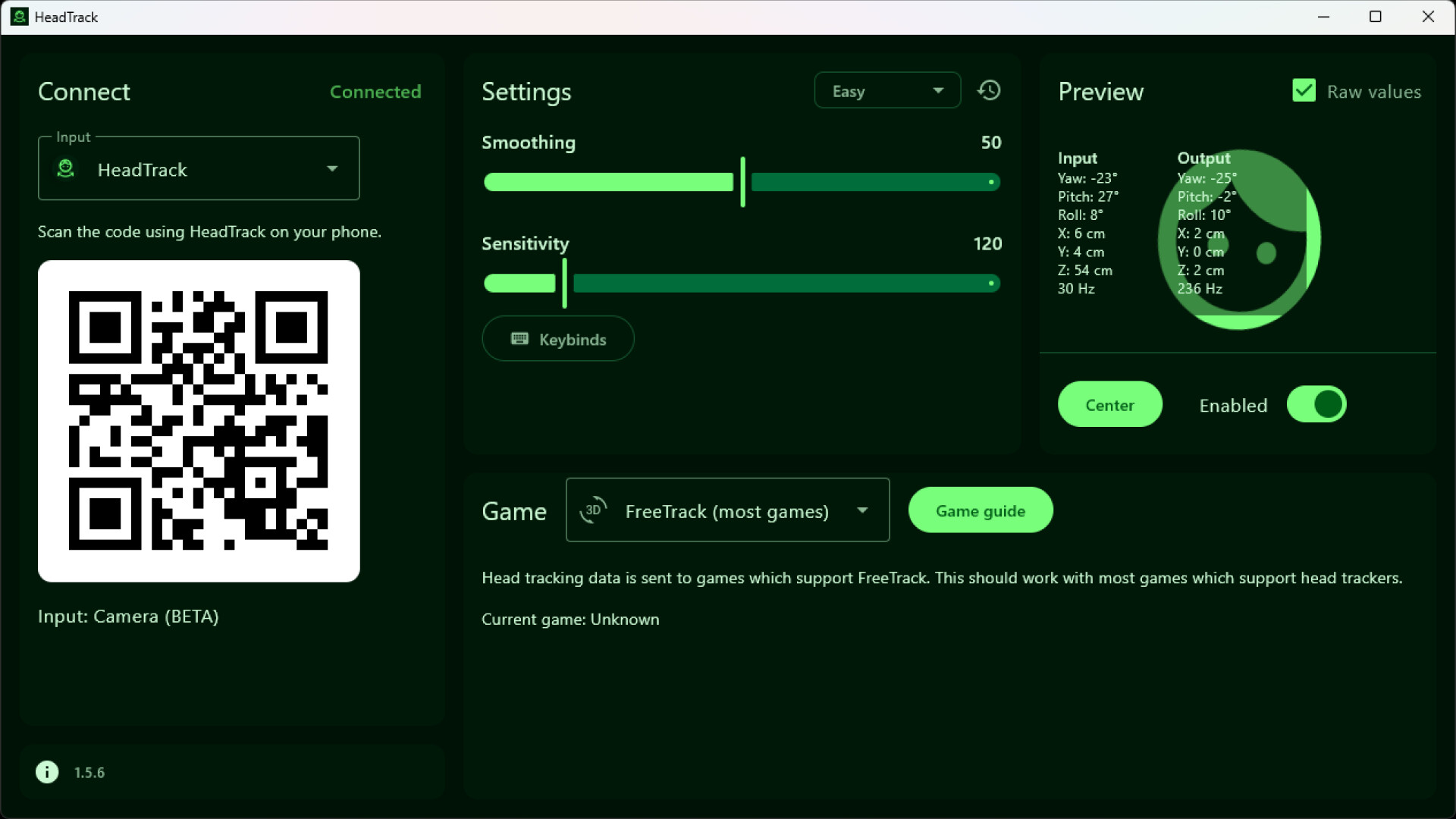
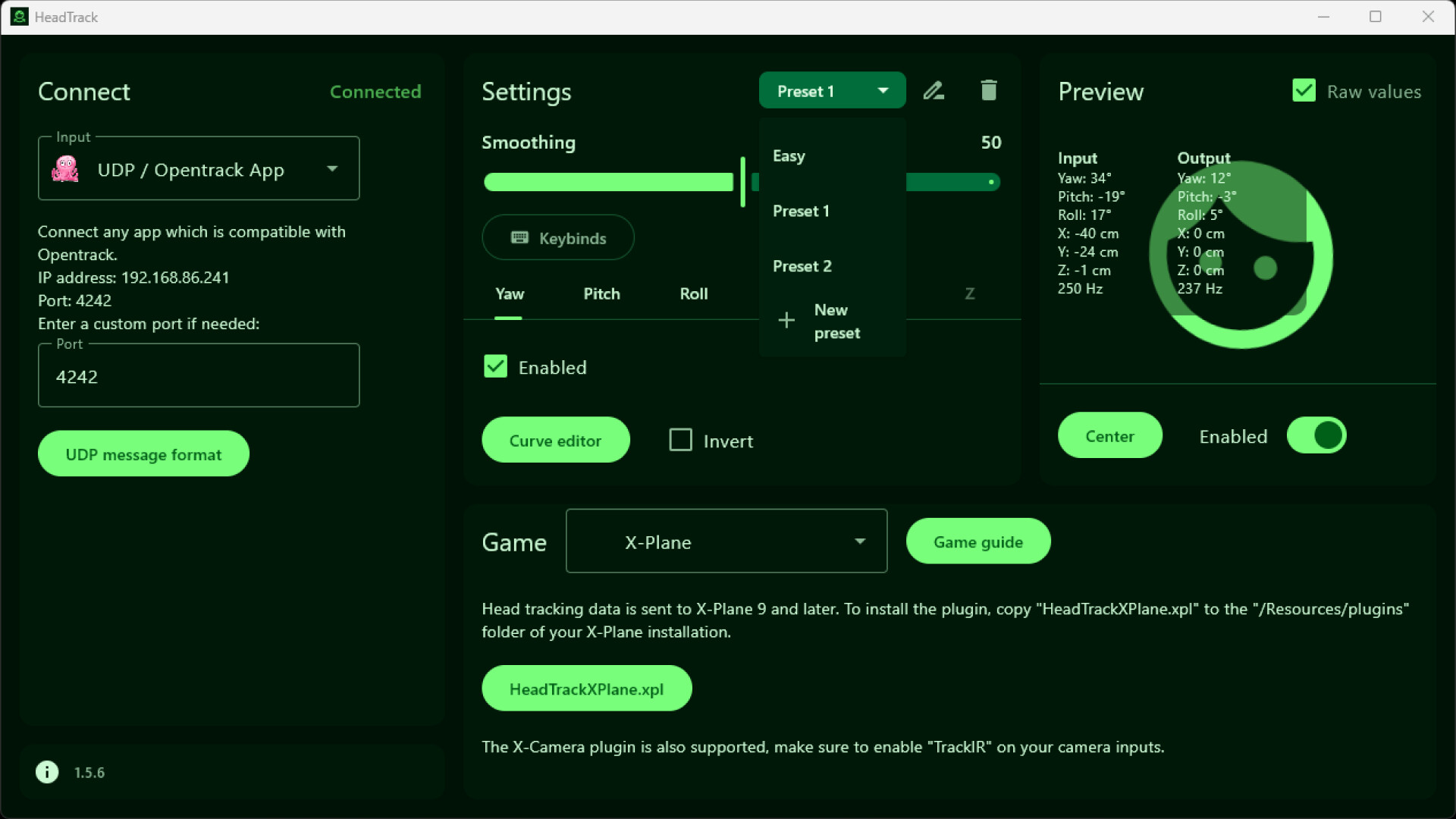
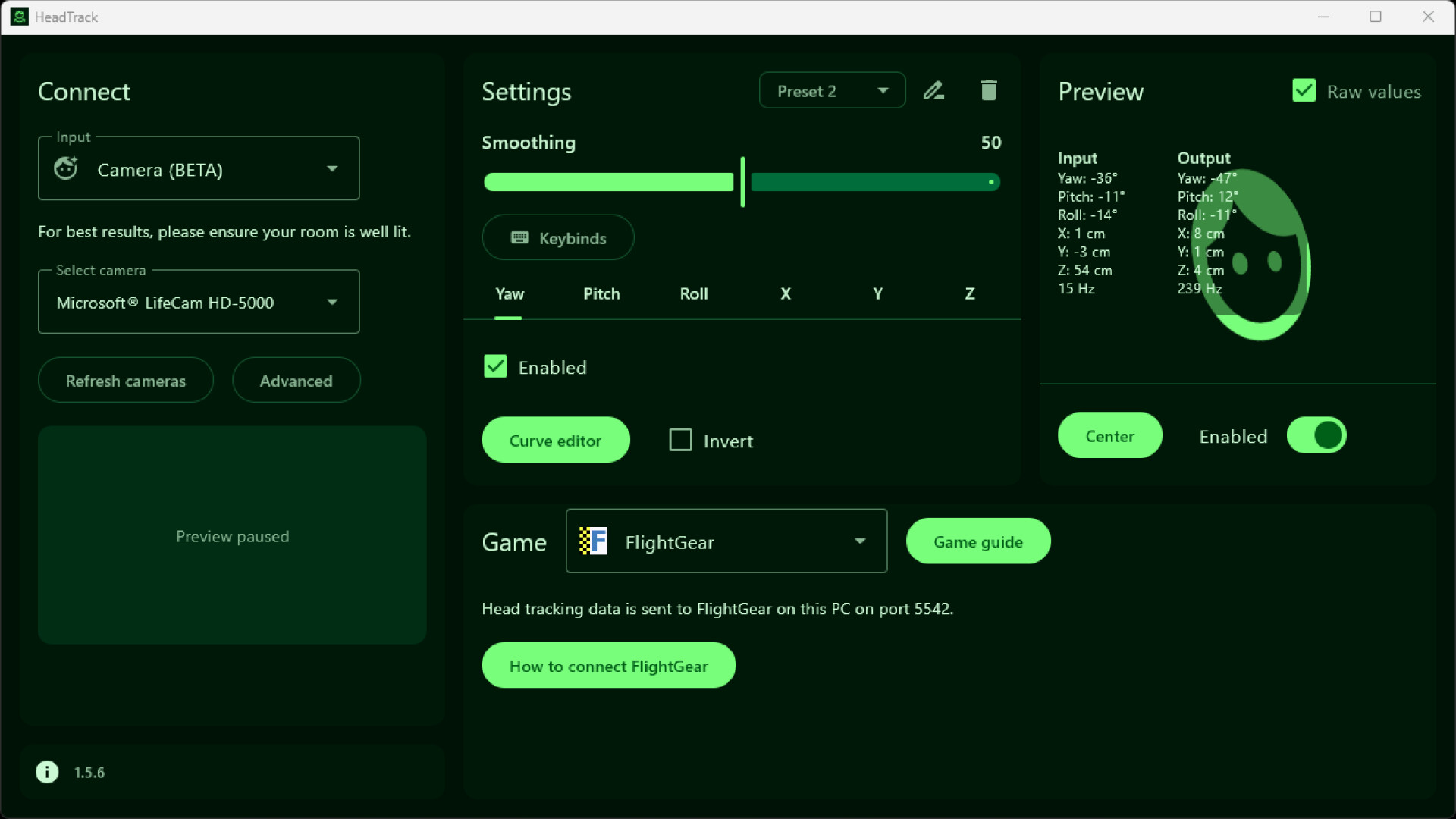
This app allows using your phone as a head tracking device for games on your PC. Works with games which support FreeTrack protocol but can also connect directly with Opentrack. Many flight or racing simulation games support head tracking. HeadTrack on your phone can be your head tracking device, no additional hardware is required. HeadTrack tracks your head movement and rotation which is sent to your games. The HeadTrack app on your phone supports Gyroscope or Camera as input. The Gyroscope input has very little latency which makes it good for quick movements. The Camera input supports full 6DoF tracking. Supported Inputs HeadTrack (recommended) - Available for Android & iOS with Gyroscope, Camera, or AirPods/Beats as input. Camera - Use your webcam as input directly in the PC app. AirPods / Beats - Use your headphones as head tracker when connected to iOS or macOS. UDP / Opentrack App - Connect any app which is compatible with Opentrack. Live Link App - Another alternative iOS app with camera input. Combine inputs - Use different inputs for rotation and position. For example, use gyroscope for (low latency) rotation and camera for position. Supported Outputs FreeTrack (recommended) - Head tracking data is sent to Windows games which support FreeTrack. This should work with most games which support head trackers. On Linux/macOS this can send head tracking data to Windows games running under Wine, Proton, CrossOver, and Parallels. Mouse - Useful for games which do not support head tracking but do support mouse input. UDP / Opentrack App - Head tracking data is sent to Opentrack on this PC. This is useful if you already have Opentrack set up. FlightGear - Plugin for FlightGear. X-Plane - Plugin for X-Plane 9 and later. The X-Camera plugin is also supported. Supported Games Most games which support head tracking should work with HeadTrack. Some games we can confirm are working: American Truck Simulator, Arma 3, Assetto Corsa, Assetto Corsa Competizione, BeamNG.drive, DayZ, Digital Combat Simulator World (DCS World), Elite Dangerous, Euro Truck Simulator 2 (ETS2), F1® 25, Farming Simulator 22, FlightGear, Grand Theft Auto V (GTA V), IL-2 Sturmovik: Battle of Stalingrad, Microsoft Flight Simulator 2020 (MSFS2020), RaceRoom Racing Experience, Star Citizen, War Thunder, X-Plane 11, X-Plane 12. In your game, look into the settings if there is any support for FreeTrack or similar head tracking devices. If there is any input or output you would like to see added, let us know!

Content & age ratings2 regional ratings

Regional ratings

DEJUSl
IGRS3
System requirementsMinimum and recommended hardware

Minimum

Minimum: Requires a 64-bit processor and operating system OS: Windows 10 (x64) or later Additional Notes: Requires a webcam or (free) HeadTrack phone app. Also works with phone apps which supports Opentrack. Download HeadTrack on your phone by scanning the QR code.

Recommended

Recommended: Requires a 64-bit processor and operating system

macOS

Minimum: OS: macOS 11 or later Processor: Apple M1 or Intel (support for Intel may be dropped at any time) Additional Notes: Requires a webcam or (free) HeadTrack phone app. Also works with phone apps which supports Opentrack. Download HeadTrack on your phone by scanning the QR code. Recommended: OS: macOS 14 or later for AirPods/Beats input Processor: Apple M1, Apple M1 for Camera input

Linux

Minimum: Additional Notes: Requires a webcam or (free) HeadTrack phone app. Also works with phone apps which supports Opentrack. Download HeadTrack on your phone by scanning the QR code. Recommended:
Supported languages1 languages
LanguageFull audio
English

A blank audio cell means full audio was not marked in the returned language list.

Screenshots & trailersScreenshots and trailers

Trailers

AchievementsTotal count and selected achievements
DemosPlayable demos on Steam

24 developer announcements, Feb 2026 to Aug 2026 · times in UTC

August

  1. HeadTrack 1.7.0

    Combine Inputs: use different inputs for rotation and position. For example, use gyroscope for (low latency) rotation and camera for position.Support for multiple connected phonesBug fixes

    SmartFusionLabs
  2. HeadTrack 1.6.3

    Fix for keybinds not working (caused by permanent input of a device) USB connection improvements Camera now shows 0FPS when disconnected instead of last FPS value Bug fixes

    Patch notes

July

  1. HeadTrack 1.6.1

    Added button in the phone app to turn off screen during head tracking. Please make sure your phone app is updated.Bug fixes

    SmartFusionLabs
  2. HeadTrack 1.5.9

    Fixed black camera input (0 FPS) for virtual OBS Studio camera Fixed crash when OBS Studio is installed Fixes for moving app to second monitor Minor UI changes Bug fixes

    Patch notes
  3. HeadTrack 1.5.8

    Bug fixes

    Patch notes

June

  1. HeadTrack 1.5.6

    Fixed USB connection with Android phones not working on Linux.

    Patch notes
  2. HeadTrack 1.5.5

    Improved head tracking stability for some cameras by selecting better camera resolution automatically Bug fixes

    Patch notes

May

  1. HeadTrack 1.5.2

    Clarified that Proton needs to be selected on Linux if the game supports native Linux as well

    Patch notes
  2. HeadTrack 1.5.1

    Added a game guide button in the app which links to setup guides for games we tested. Note that the list is still a work-in-progress. Lots of games are already supported even if they are not in the list. The game setup guides show if you…

    SmartFusionLabs

April

  1. HeadTrack 1.4.3

    Focus and exposure options for Camera input on PC. Set a custom focus if your webcam auto-focus is causing tracking issues. Lower the exposure to reduce latency even further.X, Y, and Z are now supported with Camera input on PCPerformance…

    SmartFusionLabs
  2. HeadTrack 1.3.4

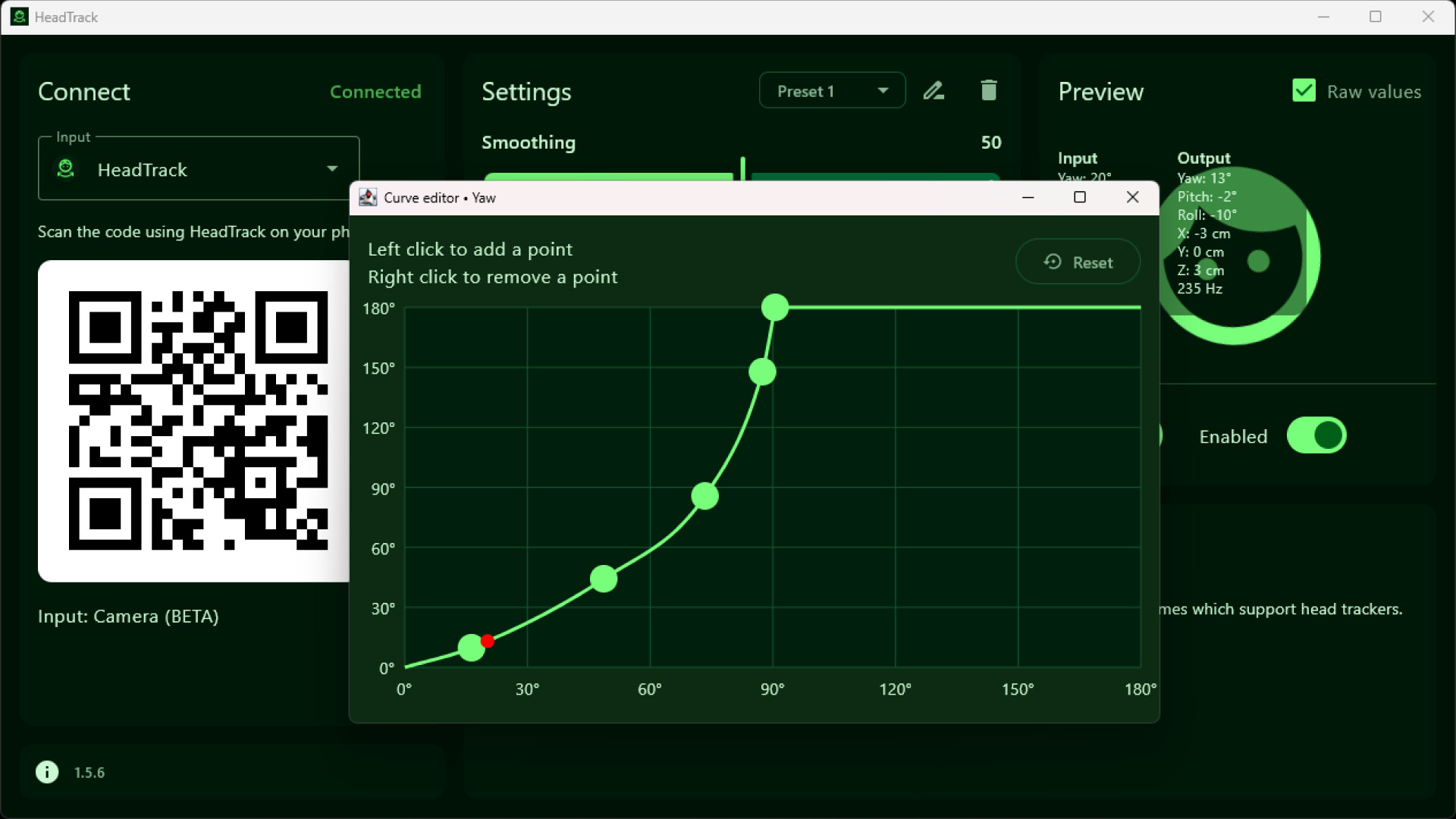
    Sensitivity is no longer applied to Roll axis, use the curve editor for this. App is now code signed on Windows

    Patch notes

March

  1. HeadTrack 1.3.2

    Curve editor is now available under axis settings (for advanced presets)Fixed a crash when resizing window or moving to second monitor with camera input

    Thomas
  2. HeadTrack 1.2.9

    Fixed preset settings overwriting other preset settings Fix for iPhone continuously connecting and disconnecting

    Patch notes
  3. HeadTrack 1.2.8

    Some webcams caused HeadTrack to crash when selecting camera input. A camera error is now shown instead of crashing the app. If this happens for you, please let us know what webcam you are using so we can investigate further. Fixed a bug…

    Patch notes
  4. HeadTrack 1.2.7

    Bug fixes

    Patch notes
  5. HeadTrack 1.2.6

    Fixed crash on startup after selecting Camera inputFix iOS connection over USB not working on Windows. Also requires download of iTunes or Apple Devices app from: https://headtrack.app/pcFixed crash on startup on some macOS devices

    Patch notes
  6. HeadTrack 1.2.5

    You can now use your webcam directly in the PC app. Let us know what you think about it on the community hub!Performance improvements and reduced CPU/memory usageAdded support for more games using FreeTrack outputFixed a crash on startup on…

    SmartFusionLabs
  7. HeadTrack 1.1.2

    Fixed an issue where the view would randomly jump to the center while holding still

    Patch notes
  8. HeadTrack 1.1.1

    Smoothing improvements which reduce jitter even further

    Patch notes
  9. HeadTrack 1.1.0

    Multiple keys can now be selected for keybindsGame name is now shown when using Freetrack outputFixes for invalid yaw/pitch/roll values causing glitchesCamera (performance) improvements on Android (app version 1.1.0). Can now also be used…

    SmartFusionLabs

February

  1. HeadTrack 1.0.4

    Bug fixes

    Patch notes
  2. HeadTrack 1.0.3

    Improved smoothing option for more stable head tracking App version is now shown in bottom left

    Patch notes
  3. HeadTrack 1.0.2

    FreeTrack support for Linux and macOS

    Patch notes
  4. HeadTrack is now available

    HeadTrack is now available on Steam!Download it today and experience everything it has to offer. There’s a discount available until 25 February, so don’t miss the chance to get it at a reduced price.Feedback is always welcome and…

    SmartFusionLabs

All games on this site